Natural language processing for marketers: what to build first
Updated: October 2026. This post now includes the guide on NLP in marketing data platforms, with a new section on writing NLP output into profiles, and without the illustrative case studies.
Natural language processing (NLP) is worth it for a marketing team when its output changes a decision: where a message is routed, who gets suppressed from a campaign, which product issue goes to the roadmap. Start with one narrow use case that triggers a clear action, write the result into the systems your team already uses, and prove the lift with a holdout before you add anything else.
Most of what customers tell you is text: reviews, support tickets, chat transcripts, email replies, survey verbatims, social comments, call transcripts and on-site search queries. None of it fits a dashboard until something turns it into fields. This guide covers which technique does what, how to implement each one, where the output should live in your stack, and how to measure whether it works.
Four techniques, four different jobs
Each NLP technique answers a different question about the same text. Most useful programs combine two or three.
| Technique | What it answers | Marketing uses | Main limit | Data needed |
|---|---|---|---|---|
| Sentiment analysis | How does this person feel, overall and about each aspect? | Brand health, CX triage, creative feedback | Sarcasm, slang and multilingual text | Any text |
| Topic modeling | What are people talking about that you didn't expect? | Voice-of-customer taxonomy, content and roadmap input | Needs volume and a human to name topics | Hundreds to thousands of documents |
| Entity extraction | Which brands, products, features or places are mentioned? | Competitor and product tracking, enrichment | Your own product names need dictionaries or training | Any text, plus samples for custom entities |
| Classification and intent | Which predefined bucket does this belong to, and what does the person want to do? | Routing, lead intent, cancellation risk, moderation | Needs labeled examples and drift monitoring | Labeled examples per class |
Aspect-level sentiment matters more than the overall score. "Great quality, terrible delivery" is neither positive nor negative; it is positive on product and negative on shipping, and those go to different teams.
Intent detection is the bridge to activation. Knowing that a message is a cancellation threat, a pricing comparison or a purchase question tells your journey orchestration what to do next.
To choose, start from the outcome. If you need to know how people feel and why, use aspect-level sentiment. If you need to find what you don't know yet, use topic modeling. If you need to track who or what is mentioned, use entity extraction. If the goal is speed and action, build classification.
Generative models changed the build, not the method
Large language models make the first version much faster to build. A classifier that used to need a trained model can now start as a prompt with a fixed list of labels, and topic discovery can start with a model that summarizes and clusters a sample of comments.
What did not change is everything around the model: a taxonomy tied to actions, labeled examples to evaluate against, privacy controls before any text leaves your systems, and measurement. A prompt-based classifier still needs precision and recall per class, and it still drifts when your products and your customers' language change.
According to Salesforce's marketing statistics, 63% of marketers already use generative AI. The gap is rarely access to a model. It is wiring the output into decisions and checking that it is right.
Prepare the text before you model it
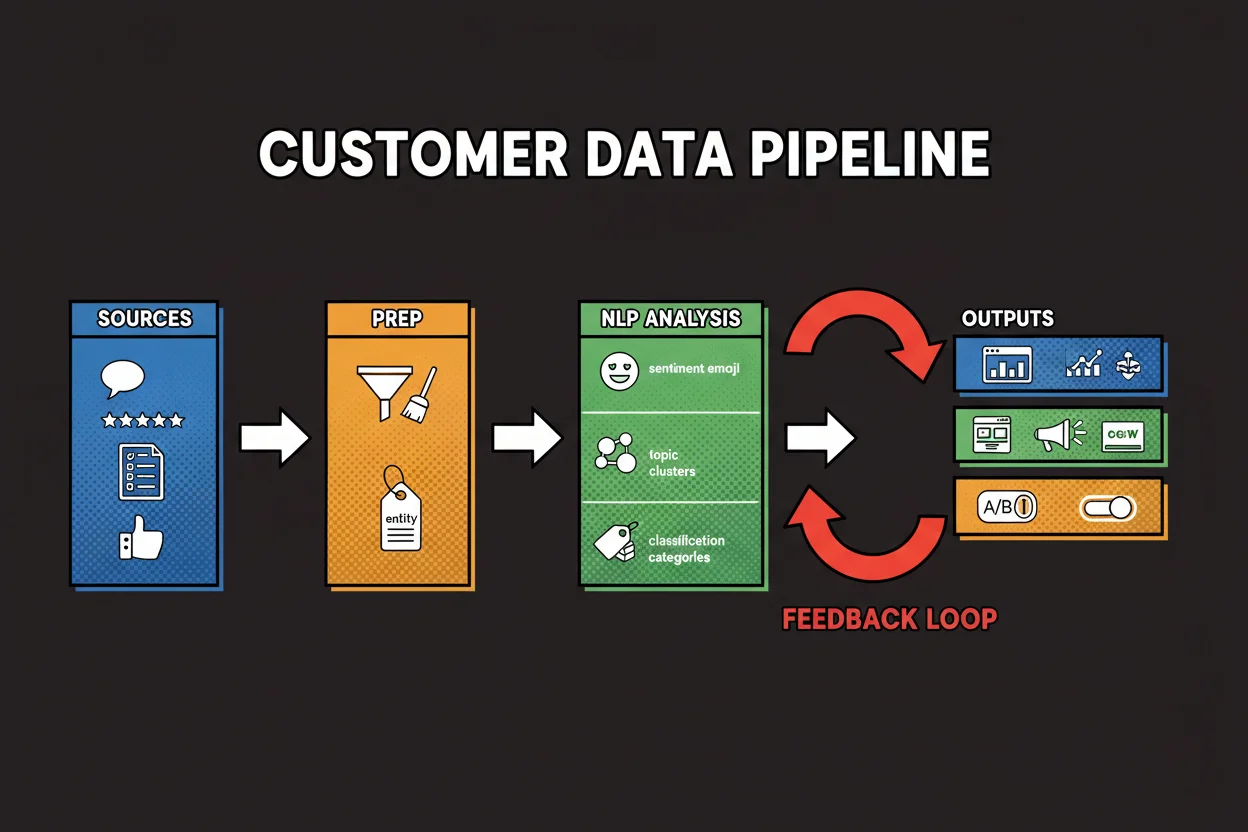
A clean pipeline with an average model beats a strong model on messy input. Before running anything:
- Inventory the sources you can lawfully use: reviews, tickets, chats, email replies, surveys, social, call transcripts.
- Mask personal data. Define which fields are redacted or tokenized, especially before text goes to an external API. Log who has access.
- Deduplicate and thread. Remove repeats and merge message threads, so one angry customer doesn't count as ten.
- Detect language and route each language to its own processing path.
- Strip boilerplate such as signatures, disclaimers and quoted replies.
- Keep the original text and its source and timestamp, so every output can be audited.
- Write a labeling guide for any custom classifier: label definitions, edge cases such as sarcasm or multi-intent messages, and how to resolve them.
Four workflows you can ship
Sentiment on customer feedback
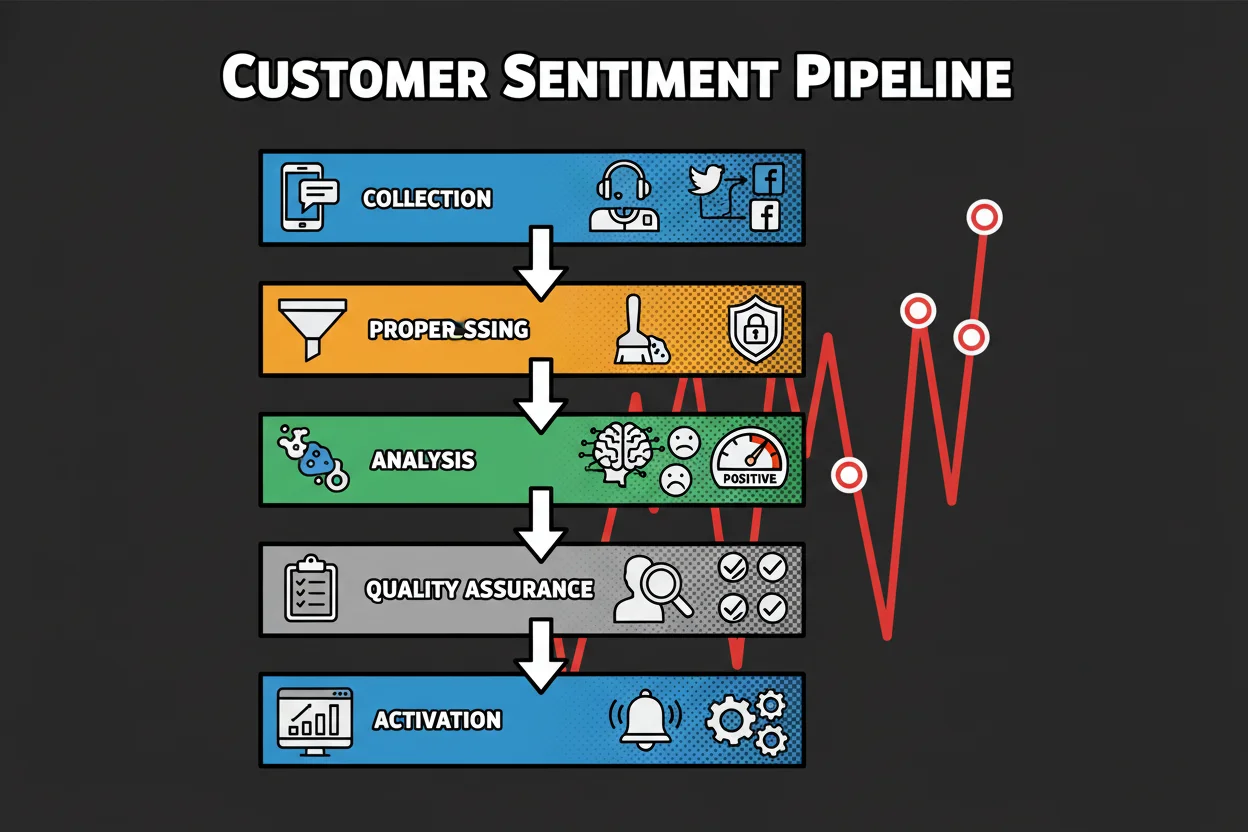
- Collect app store reviews, tickets, social posts and survey verbatims, keeping source and timestamp.
- Preprocess: language detection, deduplication, masking.
- Score overall sentiment, then aspect-level sentiment for the drivers you care about, such as price, shipping, quality and support.
- Spot-check a sample by hand every week across sources, and track precision and recall against a labeled set.
- Activate: send scores to the CX dashboard, alert on sharp drops, open tickets for critical issues, and suppress marketing email to customers in an open escalation.
Sentiment becomes most useful next to your other customer experience measures. My guide to client experience metrics covers how to combine survey scores with behavior; text sentiment adds the "why" that a score alone doesn't give.
Topic modeling for voice of the customer and content
- Aggregate text across support, reviews and social, and remove boilerplate.
- Run topic discovery and check that clusters are coherent.
- Review top terms and representative quotes for each topic, name topics in plain language and merge duplicates.
- Refresh weekly or monthly, tracking volume and sentiment per topic over time.
- Send the top negative themes to product and support, and turn high-interest themes into content briefs.
Entity extraction for competitors and products
- Define entity types: brand, product, feature, person, location, plus your product list and your competitor list.
- Use a standard named-entity model for common types and dictionaries for your own products and features.
- Sample outputs and check precision on the custom types.
- Normalize variants to one canonical name and attach your internal IDs.
- Build views of competitor mentions by channel and product mentions with sentiment, and alert the brand team when a competitor spikes.
Classification for routing, intent and moderation
- Define labels that map to an action, for example billing, technical issue, cancellation risk, product question, sales inquiry, other.
- Label a few hundred examples per class, including edge cases.
- Train a classifier, or configure a rules-plus-LLM approach. Set decision thresholds by the cost of each error.
- Track precision, recall and F1 per class on a weekly sample, and update labels as new patterns appear.
- Tag messages in near real time and route each class to its team with its own response time target.
A prompt-based starting point for this workflow can be as short as this:
You classify customer messages for routing.

Labels: billing, technical_issue, cancellation_risk, product_question, sales_inquiry, other.

For each message, return one JSON object with: label, confidence (0-1), recommended_team.
Team mapping: billing → Finance; technical_issue → Support; cancellation_risk → Retention;
product_question → Support; sales_inquiry → Sales; other → Support.

Output only JSON objects, one per line.
Where the output should live in your data platform
NLP pays off when its output becomes a field or an event that segmentation, personalization and reporting tools can read. That is a data architecture decision, not a model decision.
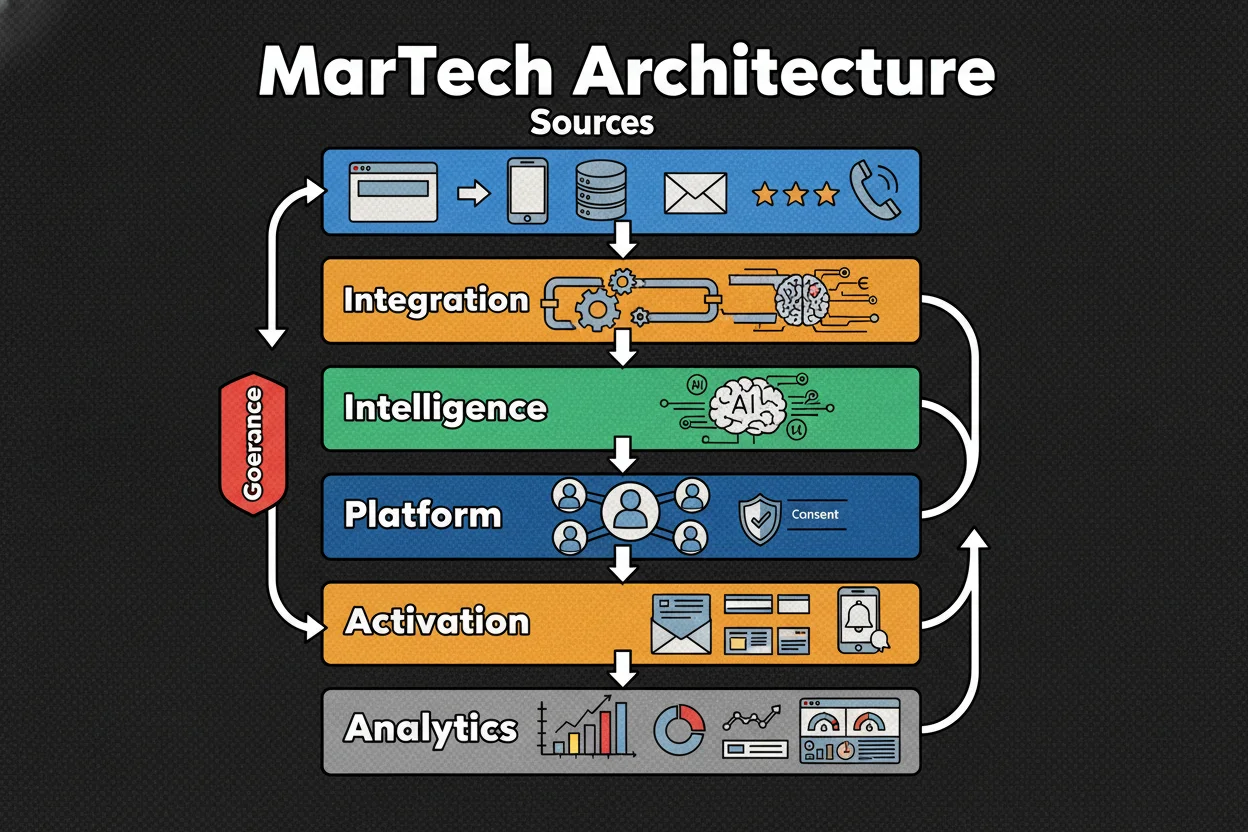
- Join on identity, with consent. Enriched signals are only useful on a profile if identity resolution can attach the message to the right customer, and only if your consent basis covers that use.
- Separate stable traits from rolling signals. Interests or product affinity can be profile attributes. Sentiment changes, so store it as events or as a rolling aggregate such as sentiment over the last 30 days.
- Store the confidence with every output. Then each activation rule can set its own threshold: a suppression rule can act on lower confidence than an alert to a VIP account manager.
- Pick the pattern by latency. Batch jobs suit daily review mining and survey coding. Event streaming suits real-time alerts and on-site personalization.
- Keep components swappable. Sources, NLP services and destinations should talk through APIs, so you can change a model or vendor without rebuilding the pipeline.
- Align the taxonomy with campaign planning. Labels should match how marketers segment and plan, not only how a model clusters words.
- Document the decision behind each output. For every field, write down which rule or journey uses it, so outcomes can be traced back to inputs.
If you are designing where these fields land, my posts on CDP architecture and data management for analytics cover the profile and governance side.
Choosing tools: API, platform or no-code
Tools fall into a few categories. Compare them on your own text, not on feature lists.
| Category | Examples | Fits | Watch for |
|---|---|---|---|
| Cloud NLP APIs | Google Cloud Natural Language, Amazon Comprehend | Fast production use of sentiment, entities and classification | Data residency, customization limits, cost at volume |
| LLM APIs | General-purpose model providers | Prompt-based classification, summarization, topic discovery | Consistency of output, evaluation, data handling terms |
| Model platforms and open-source libraries | Hosted endpoints, spaCy and transformer toolkits | Custom taxonomies, niche entities, multilingual tuning | Needs data science and MLOps capacity |
| Orchestration and integration | ETL/ELT platforms with connectors | Moving text to NLP services and results to the CDP or warehouse | Licensing and engineering effort |
| No-code and low-code tools | Point-and-click labeling and classification | Marketer-led pilots, quick routing | PII handling, export paths, lock-in |
| CDPs with native text analytics | Built-in enrichment add-ons | Simple integration into existing segments | Limited depth and transparency |
Both cloud APIs price by volume of text, with free tiers, and Amazon charges separately for training and hosting custom models. Check the current pricing pages above and project the cost from your real monthly volume.
A two-to-four-week bake-off is enough to decide:
- Fix the use case, the main quality metric, the latency need and the privacy rules.
- Build an evaluation set from real samples per channel and language, including edge cases and messages with personal data.
- Run two or three tools on the same data with the same preprocessing.
- Compare precision, recall and F1 by class, and review the confusion cases with people who know the customers.
- Test throughput at peak volume and p95 latency.
- Check write-back to the CRM, marketing automation, BI and helpdesk, and the export path if you leave.
- Ask whether the vendor trains on your data by default, where it processes it, and how versioning and rollback work.
Measure model quality and business lift separately
Two different questions need two different measurements: is the model right, and does acting on it help?
Model quality. Accuracy is misleading when classes are unbalanced: if most tickets are product questions, a model that always says "product question" scores well and misses what matters. Use per-class metrics instead (definitions):
- Precision: of the messages labeled "cancellation risk", how many really were. Favor it when false alarms are expensive, such as escalating to the wrong team.
- Recall: of the real cancellation risks, how many the model caught. Favor it when a miss is expensive, such as an unhappy high-value customer.
- F1: the balance of both, useful when classes are skewed. If one error costs more than the other, weight it with an F-beta score.
Break these down by channel, language and customer tier. A model that works on English email and fails on Spanish chat looks fine in the overall number.
Business lift. Treat an NLP-driven change like any product change:
- Run a model-on versus model-off test, and keep a small persistent holdout that never sees the model's decisions.
- Pre-register one to three primary metrics, such as save rate or revenue per user, and guardrails such as CSAT, response time or complaint rate.
- Run for at least two weekly cycles, and roll back if a guardrail breaks for a sustained period.
A useful dashboard shows four things on one page: model quality by class, input data quality (volume by source, masking rate, unparseable messages), operations (throughput, latency, human review rate), and business outcomes for the segments the model triggers.
What goes wrong after launch
- Drift. New product names, campaigns and slang change the input. Sample weekly, monitor class frequencies, and retrain or update prompts on a schedule.
- Uneven performance. Languages or customer groups underrepresented in the labeled data get worse results. Balance the labeled set and monitor per segment.
- Overfitting. A custom model that scores well on its training set and poorly on live data. Keep a strict holdout of fresh data.
- Slow models. An accurate model that delays routing will be switched off by the support team. Measure latency before launch.
- No audit trail. Version models, prompts and taxonomies, and keep a sample of scored messages, so you can answer why a customer was routed or suppressed.
- Vanity signals. A sentiment score that no rule or person acts on is a cost, not an asset.
Vendor case studies, such as Sprinklr's account of Chick-fil-A's sauce relaunch, show the same pattern when it works: detect a change early, find the driver, act, and measure the result. Read them as the vendor's account of its own client.
What to check this week
- Pick one use case with an action. Write down the text source, the label or score, and the decision it will change, for example routing cancellation-risk messages to retention.
- Check where the output would land. Confirm which CRM or CDP field would hold it and which rule would read it.
- Label a sample. Hand-label a few hundred recent messages for that use case; it becomes the evaluation set for any tool you try.