

TL;DR:
- Reliable attribution requires high-quality, comprehensive tracking data and sufficient conversion volume.
- Advanced models like Markov and Shapley need organizational alignment and proper data discipline to be effective.
- Continuous validation, model comparison, and data monitoring are essential for improving marketing ROI and decision-making.
Measuring the true impact of every marketing touchpoint is one of the hardest problems in digital analytics. Customers interact with your brand across paid search, social, email, and organic channels before converting, and standard last-click models silently erase most of that journey. The result is misallocated budget, undervalued channels, and campaigns optimized on incomplete signals. This guide walks you through the exact steps to build a reliable attribution modeling practice, from data prerequisites and platform setup to advanced Markov and Shapley implementations, common pitfalls, and how to validate results that actually drive better marketing decisions.
Table of Contents
- Preparing for attribution modeling success
- How to implement attribution modeling step-by-step
- Common mistakes and how to troubleshoot attribution issues
- Verifying results and optimizing marketing campaigns
- Why most attribution guides miss the real challenges
- Unlock advanced attribution with expert tools
- Frequently asked questions
Key Takeaways
| Point | Details |
|---|---|
| Data-driven attribution basics | Understanding machine learning models in GA4 and Google Ads helps marketers assign credit more accurately. |
| Advanced model implementation | Custom Markov and Shapley models offer deeper insights but require more technical expertise and clean data. |
| Troubleshooting common issues | Having sufficient data, correct tracking, and model validation prevents misleading attribution results. |
| Actionable campaign optimization | Regularly comparing attribution models enables marketers to optimize their budget and increase ROI. |
Preparing for attribution modeling success
Before you configure a single model, you need the right foundation. Attribution modeling is only as trustworthy as the data feeding it, and gaps in your tracking layer will produce misleading credit allocation regardless of how sophisticated your model is. Think of it like building a house: no amount of architectural elegance compensates for a cracked foundation.
Here is what your tech stack should include before you start:
- Google Analytics 4 (GA4): Your primary event tracking and conversion reporting layer
- Google Ads: Linked to GA4 for cross-platform credit comparison
- BigQuery: Essential for custom modeling with Markov chains or Shapley values
- A tag monitoring tool: Platforms like Trackingplan catch broken pixels and misconfigured events before they corrupt your data
Data volume matters more than most guides admit. For data-driven attribution to function accurately, you need a meaningful volume of conversion events. Low-traffic accounts with fewer than 300 conversions per month will see the model fall back to rule-based logic, which defeats the purpose of going advanced.
Before implementation, complete these steps:
- Audit your GA4 event schema and confirm all key conversion events fire correctly
- Align on business goals: what counts as a conversion, and which touchpoints are in scope?
- Verify that cross-domain tracking is configured if your funnel spans multiple domains
- Confirm consent mode is active so that modeled conversions fill gaps from cookie-restricted users
For a broader overview of attribution modeling before diving into setup, that resource covers the conceptual landscape well.
| Prerequisite | Minimum requirement | Why it matters |
|---|---|---|
| Monthly conversions | 300+ | Enables data-driven model accuracy |
| GA4 event tracking | All key funnel events | Ensures complete path data |
| BigQuery export | Active and linked | Required for custom models |
| Google Ads link | Confirmed | Enables cross-platform comparison |
GA4 and Google Ads default to data-driven attribution, which analyzes both converting and non-converting paths to allocate credit using machine learning, a significant improvement over legacy position-based models that rely on fixed rules.
Pro Tip: Run a data quality audit using a monitoring platform like Trackingplan before enabling any attribution model. A single misfiring event tag can silently distort conversion paths for weeks.
How to implement attribution modeling step-by-step
With your prerequisites covered, let’s walk through the exact steps for setting up and comparing attribution models, both standard and advanced.

Step 1: Define your conversion actions. In GA4, navigate to Admin > Conversions and confirm that all relevant events are marked as conversions. Be selective. Marking too many micro-events as conversions dilutes the signal.
Step 2: Select your attribution model in GA4. Go to Admin > Attribution Settings. You will see options including data-driven, last click, first click, linear, and time decay. For most accounts with sufficient volume, data-driven is the right starting point.
Step 3: Link Google Ads and compare models. Once linked, use the model comparison tool in Google Ads to see how credit shifts between channels under different models. This comparison is often where the most actionable insights surface.
Step 4: Export raw path data to BigQuery. For multi touch attribution analysis beyond what GA4 natively supports, export your event data to BigQuery. From there, you can build Markov chain models that calculate removal effects per channel, or Shapley value models that distribute credit based on cooperative game theory.
Step 5: Validate and iterate. Never treat your first model output as final. Compare results across models and look for channels that are systematically over or undervalued.
| Model type | Setup complexity | Best for | Data requirement |
|---|---|---|---|
| Last click | Low | Quick baseline | Any volume |
| Data-driven (DDA) | Low | Most GA4 accounts | 300+ conversions/month |
| Markov chain | High | Custom path analysis | Large datasets |
| Shapley value | High | Fair credit distribution | Large datasets |
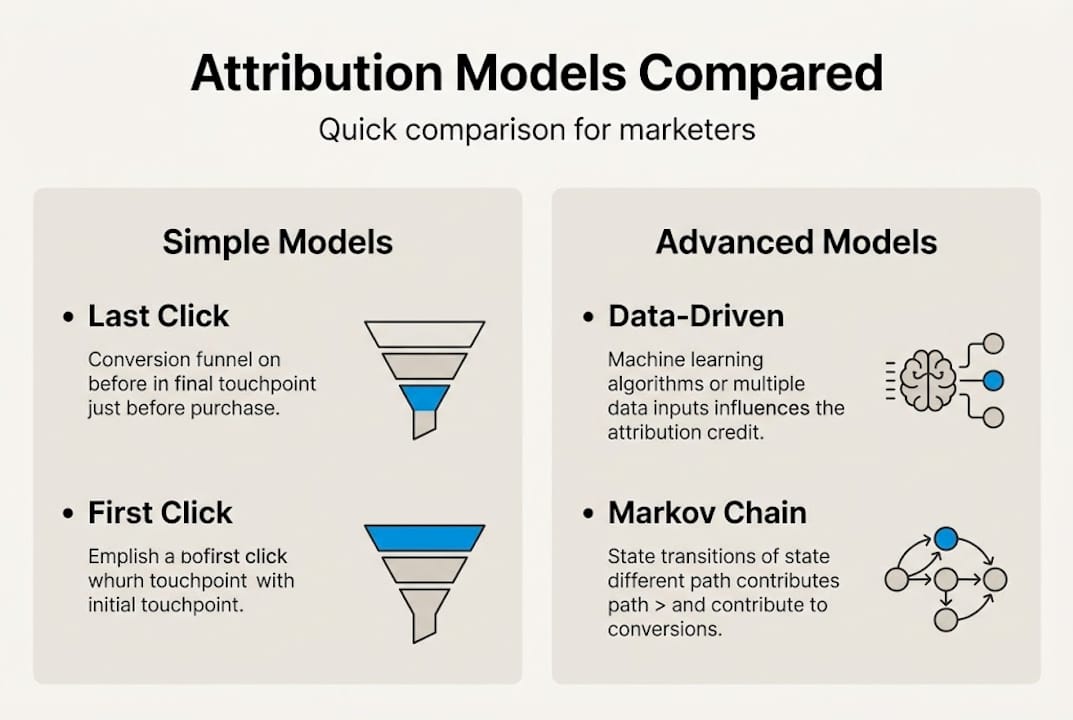
If you work with Adobe Analytics attribution models, the logic is similar but the interface differs significantly. And for teams building out broader measurement frameworks, reviewing data analytics practices alongside attribution setup pays dividends.
Pro Tip: When running Markov models in BigQuery, always calculate the removal effect for each channel separately. A channel with high touchpoint frequency but low removal effect is likely getting inflated credit under simpler models.
Common mistakes and how to troubleshoot attribution issues
Once models are set up, it’s vital to know where things can go wrong and how to resolve the most common attribution problems.
The most frequent mistake is running data-driven attribution on accounts with insufficient conversion volume. DDA requires 300 to 600+ conversions per month to operate accurately. Below that threshold, the model lacks enough signal to distinguish meaningful patterns from noise, and the outputs become unreliable.
Other common issues include:
- Misconfigured goals: Duplicate conversion events or incorrectly scoped events inflate conversion counts and distort path analysis
- Short lookback windows: Default 30-day windows miss longer consideration cycles in B2B or high-value consumer categories
- Ignoring path length: Accounts with primarily single-touchpoint conversions gain little from multi-touch models
- Switching models mid-campaign: Changing your attribution model resets historical comparisons and makes trend analysis unreliable
- Missing offline touchpoints: Phone calls, in-store visits, and CRM data left out of the model create systematic blind spots
For accounts trying to achieve higher ROI with attribution modeling, these errors are the primary reason results fall short of expectations.
The uncomfortable truth: Most attribution errors are not platform bugs. They are data discipline failures. A model cannot fix what broken tracking or misaligned goals feed into it.
When troubleshooting, start with your Google Analytics 4 goals configuration before touching the attribution model itself. Nine times out of ten, the problem lives upstream.
Pro Tip: Set up automated alerts in GA4 or use a monitoring platform to flag sudden drops in conversion event volume. A 20% drop in tagged events overnight is almost always a tracking issue, not a real performance shift.
Verifying results and optimizing marketing campaigns
With troubleshooting strategies in hand, let’s focus on how to validate your results and continually improve your marketing ROI through attribution.
Validation starts with model comparison. Comparing models in GA4 and Google Ads reveals how credit shifts between channels when you change the attribution logic. If display campaigns gain significant credit under data-driven but receive almost none under last click, that gap represents real budget reallocation opportunity.
Here is what to look for when reviewing attribution outputs:
- Channels with large credit shifts: These are your highest-priority optimization targets
- Touchpoints that appear frequently in converting paths but receive low credit: These are often assist channels that deserve more investment
- High-frequency, low-conversion-rate touchpoints: These may be inflating costs without contributing meaningfully to outcomes
- Path length distribution: If most conversions happen in one or two touchpoints, simpler models may be adequate for your business
| Optimization action | Signal from attribution data | Expected outcome |
|---|---|---|
| Increase display budget | High assist credit, low last-click credit | More top-of-funnel reach |
| Reduce branded search spend | Consistently last-click, low assist value | Reallocate to mid-funnel |
| Expand email nurture sequences | Strong mid-path presence | Improve conversion rates |
| Test new channels | Gaps in current path coverage | Diversify touchpoint mix |
For teams managing complex, multi-platform environments, cross channel attribution frameworks help unify data across paid, owned, and earned channels into a single view. And if you are evaluating tooling, reviewing attribution platform features before committing to a solution saves significant time.
Iterative optimization is the real payoff. Attribution modeling is not a one-time configuration. Run quarterly model comparisons, update your conversion event taxonomy as your funnel evolves, and treat the outputs as a living signal rather than a static report.
Why most attribution guides miss the real challenges
Most attribution content focuses on platform mechanics: which buttons to click, which model to select, how to read a report. That is necessary but not sufficient. The real determinant of attribution success is organizational data discipline, not platform sophistication.
We have seen teams implement Shapley value models in BigQuery with technically flawless SQL, only to make poor decisions because their underlying event data was inconsistently labeled across campaigns. The model was correct. The inputs were not.
Another pattern worth naming: teams average attribution insights across their entire channel mix instead of segmenting by audience, funnel stage, or campaign type. Blending a brand awareness campaign with a retargeting campaign into one attribution view produces numbers that are accurate for neither.
The uncomfortable reality is that advanced models like Markov and Shapley require cross-team buy-in to be actionable. Media buyers, analysts, and finance teams need to agree on what the model is measuring and trust its outputs before budget decisions change. Without that alignment, even the best multi touch attribution insights sit unused in a dashboard.
Attribution modeling cannot compensate for weak campaign strategy. It can tell you which channels assist conversions, but if the creative is poor or the offer is wrong, the model will accurately reflect a broken funnel. Use attribution to optimize what is working, not to diagnose why a fundamentally flawed campaign is underperforming.
Unlock advanced attribution with expert tools
Building a reliable attribution practice requires more than the right model. It requires clean, trustworthy data flowing into every layer of your stack. That is where specialized tools make a measurable difference.
Platforms like Trackingplan continuously monitor your tracking implementation, catching broken pixels, misfiring events, and consent configuration issues before they corrupt your attribution data. Paired with the right digital marketing tools, you can build a measurement infrastructure that supports both standard and custom modeling with confidence. Explore how to boost ROI with attribution modeling and review the data quality tools that help your team maintain the data integrity attribution depends on.
Frequently asked questions
What is digital attribution modeling?
Digital attribution modeling is a framework for assigning credit to marketing touchpoints across digital channels to better understand what drives conversions. GA4 and Google Ads default to data-driven attribution, which uses machine learning to analyze both converting and non-converting paths.
How do I know if my data is sufficient for DDA?
DDA requires 300 to 600+ conversions per month to allocate credit accurately. Below that threshold, the model lacks enough signal and typically reverts to a rule-based fallback.
Can I use custom attribution models beyond GA4?
Yes. Custom Markov and Shapley models can be implemented using BigQuery SQL, giving you more control over credit distribution logic than native GA4 models allow.
What errors should I watch for when switching attribution models?
Look for sudden drops or spikes in conversion data after a model switch, which often signal misconfigured goals or data volume that is insufficient for the new model. GA4 and Google Ads analyze both paths to allocate credit, so any gap in event tracking will surface quickly.
How can attribution modeling drive better marketing decisions?
Attribution modeling identifies which channels and touchpoints genuinely contribute to conversions so you can reallocate budget toward what works. Comparing models in GA4 tools reveals credit shifts that translate directly into actionable budget decisions.
Recommended
- What Is Marketing Attribution A Guide to Measuring Real Impact – The data driven marketer
- A Practical Guide to Adobe Analytics Attribution Models – The data driven marketer
- A Marketer’s Guide to Multi Touch Attribution – The data driven marketer
- What Is Attribution Modeling and How Does It Work? – The data driven marketer