Table of Contents
- Why Modern Marketing Demands Unified Data Platforms
- Core Capabilities of a Modern Marketing Data Platform
- Build vs Buy: How to Choose the Right Approach
- Reference Architectures and Integration Patterns
- Data Governance, Security, and Compliance in Marketing Data Platforms
- Evaluating Vendors and the Marketing Data Platform Landscape
- Frequently Asked Questions About Marketing Data Platforms
- Conclusion and Next Steps: Accelerate Your Marketing Data Platform Journey
Get the complete blueprint to evaluate, design, and implement a marketing data platform. This guide blends strategy with hands-on execution: architecture patterns, integration checklists, governance frameworks, and vendor selection tools. It’s written for CMOs, marketing ops, data architects, and IT leaders who want unified data, faster insights, and confident activation across channels. Use the templates and diagrams to align teams and move from plan to production.
Why Modern Marketing Demands Unified Data Platforms
The fragmentation problem in marketing data
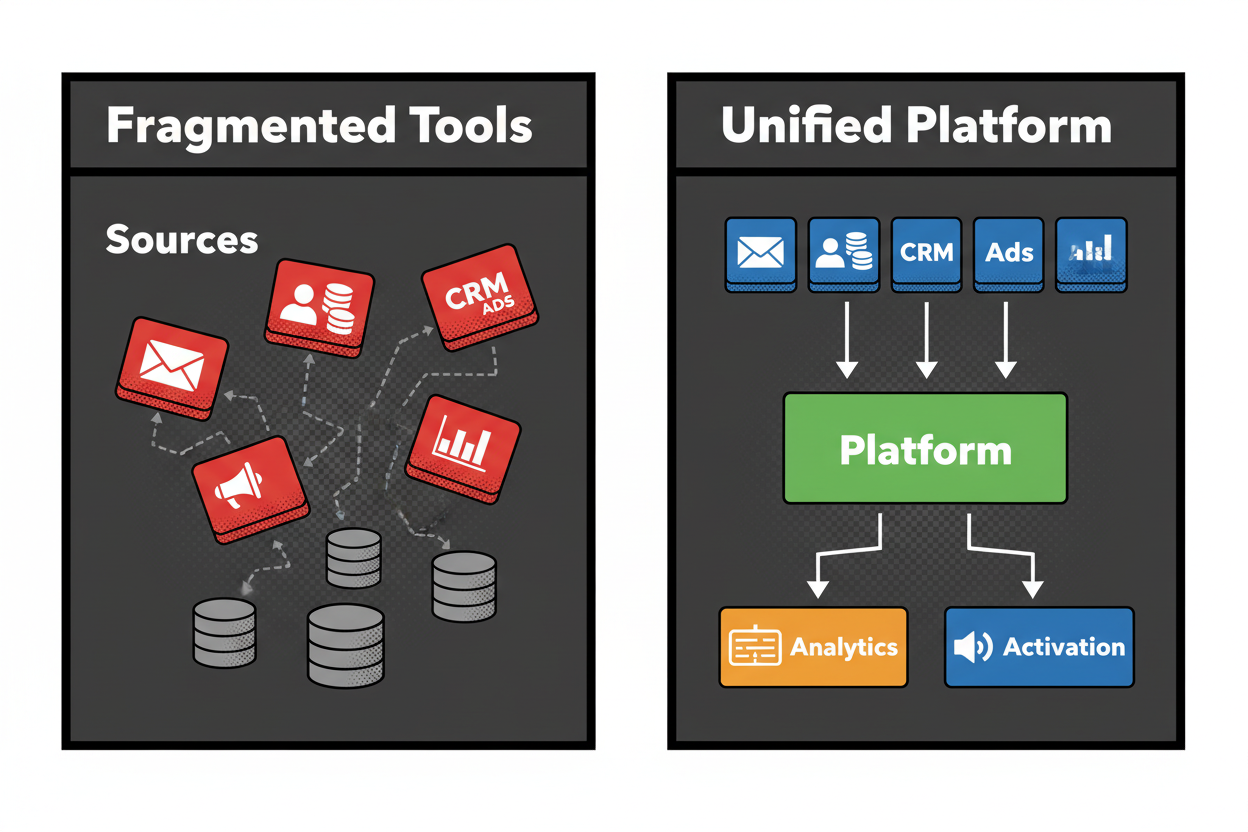
Your marketing data is everywhere. Web and app events stream into analytics, CRM holds account and consent data, ad platforms track impressions and conversions, POS logs purchases, and support tools capture tickets. Each system uses different identifiers and schemas, so small mismatches become big blind spots.
It’s not a handful of sources either. B2B teams juggle roughly 12 customer data sources and B2C teams manage about 9, long before analysis begins [reference:Salesforce][reference:2]. Add partner feeds, product telemetry, and offline files, and you’re stitching a quilt every week. That constant stitching slows decisions and erodes trust in the numbers.
Business risks of siloed data
Silos cost money and reputation. Personalization falls flat when identity is partial. Media dollars get wasted when recent buyers still see acquisition ads. Reporting splinters into competing dashboards, each “right” in its own way.
There’s also compliance risk. If consent and preferences aren’t synchronized, you can contact people who withdrew permission. That hurts brand trust and invites scrutiny. Only 31% of marketers are fully satisfied with their data unification, which explains why teams spend more time reconciling than improving performance [reference:Salesforce].
A simple email campaign shows the difference. Fragmented: CRM has outdated preferences, web events sit in analytics, and ad IDs aren’t mapped. The “back-in-stock” email hits recent purchasers and unsubscribed users, driving complaints and low conversions. Unified: the platform merges CRM, web events, and consent data; buyers and unsubscribes are suppressed, a browse-abandon segment gets tailored content, and conversions lift while complaints drop.
What a unified marketing data platform unlocks
A unified marketing data platform creates one reliable foundation for analytics and activation. It ingests from every source, resolves identities, standardizes schemas, and makes the data queryable and action-ready. Teams move from “export and upload” to governed, repeatable flows.
The payoffs show up fast. Audience refresh cycles shrink from days to minutes. Frequency capping works across email and ads. Closed-loop measurement connects spend to actual revenue, not just clicks. And because consent and purpose are enforced at the data layer, you scale personalization with less risk.
You also get a durable identity graph. That reduces duplicate impressions, enables next-best-action across channels, and improves attribution. When data, identity, and activation sit on the same rails, ROI gets clearer and cycles get faster.
What this guide covers and how to use it
Here’s how to get the most from this guide. First, clarify the scope by learning what a marketing data platform is and isn’t. Then weigh build vs buy using the decision matrix. Next, dive into reference architectures and integration patterns to design your stack.
You’ll also get governance, security, and compliance best practices to keep data trustworthy and safe. Finally, use the vendor evaluation tools, RFP checklist, and PoC scorecard to run a clean selection process. Throughout, you’ll find copy-ready templates and diagrams you can drop into decks to align stakeholders.
Only 31% of marketers feel confident in their unification today, and 78% report siloed marketing and loyalty technologies [reference:Salesforce]. Use this guide to break that pattern and turn your data into a compound advantage.
Core Capabilities of a Modern Marketing Data Platform
What is a marketing data platform?
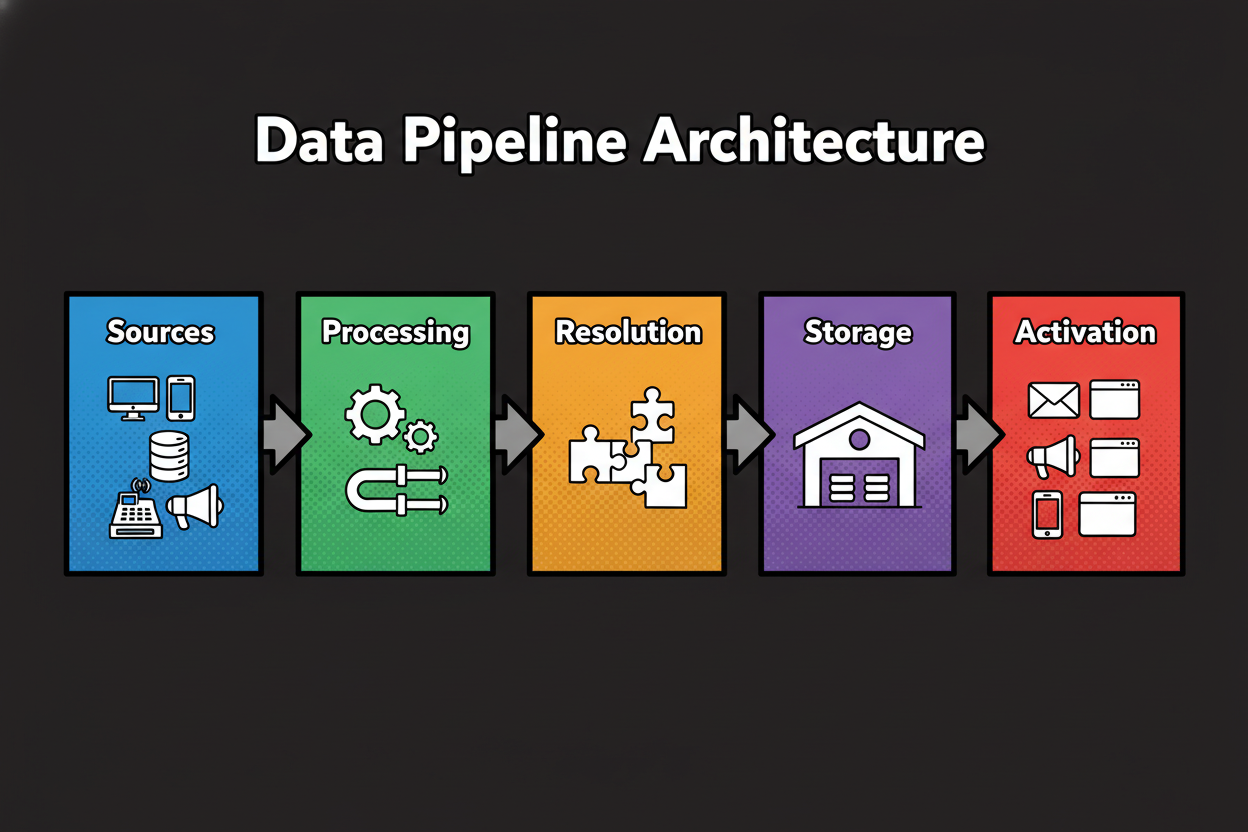
A marketing data platform is a centralized system that ingests customer and campaign data from every source, unifies identities, models and analyzes behavior, then activates insights across channels. It connects data to analytics and orchestration so teams can personalize, measure, and optimize marketing with confidence.
Think of it as the connective tissue between sources, analytics, and engagement. It gives marketers and data teams a single, governed path from raw events to ready-to-use segments and insights.
Essential capabilities you should expect
Start with ingestion that handles batch loads, streams, and APIs. You want connectors for web, app, CRM, ads, POS, and support systems, plus a way to backfill history. Strong platforms also standardize schemas, tag PII, and enforce validation rules on the way in.
Identity resolution is core. Deterministic keys (email, phone, customer ID) should merge with probabilistic signals (device, behavior) to form a cross-channel graph. On top, modeling and transformation shape data into reusable entities like customer, account, event, and product.
Analytics and activation complete the loop. Your BI and data science tools should query the same governed store, while reverse ETL, audience APIs, and native connectors push segments to email, ads, mobile, and web. Governance runs across the stack: catalog, lineage, role-based access, and consent policies. Many teams have real-time data but still need IT to execute campaigns, so self-serve activation is non-negotiable [reference:2].
How it differs from CDPs, DMPs, and data warehouses
Here’s how a marketing data platform compares to adjacent tools. Use them together, but know each one’s job early to avoid overlap and rework.
| Capability | Marketing Data Platform | CDP | DMP | Data Warehouse |
|---|---|---|---|---|
| Data ingestion breadth | Broad: multi-structured (batch/stream), across marketing, product, and ops sources | Broad for customer and engagement data via marketer-friendly connectors | Narrow: primarily third-party/anonymous and ad-tech feeds | Broad but DIY: pipelines required via ETL/ELT tools |
| Identity resolution | Native deterministic/probabilistic, cross-channel graph | Native deterministic with some probabilistic, marketer-configurable | Anonymous IDs/cookies; limited PII resolution | Not native; implemented via SQL/models and external tools |
| Data model flexibility | High: supports raw + modeled layers (lake/lakehouse) | Moderate: opinionated customer/event schema | Low: audience-centric, limited schema depth | High: flexible schemas, modeling controlled by data teams |
| Real-time processing | Yes: streaming/events for near-real-time use cases | Often: near-real-time for profiles/segments | Yes: for ad targeting and bid-time use | Varies: near-real-time possible but non-trivial to engineer |
| Activation connectors | Many: email, ads, mobile, web, reverse ETL, APIs | Many: strong marketer-facing activation connectors | Ad ecosystems primarily (DSPs/SSPs/DMP pipes) | None native; require external tools for activation |
| Privacy controls | Strong: consent, preferences, PII handling, policy enforcement | Strong: consent and preference orchestration | Limited: focused on anonymous audiences and segments | Enterprise-grade controls possible but generic, not marketing-specific |
| Governance features | Catalog, lineage, quality rules, role-based access | Segment-level controls, profile policies, audit logs | Basic audience controls, limited lineage | Robust data governance depends on platform stack and add-ons |
| Cost-to-scale | Variable: usage/storage/compute with activation costs | Profile/event based pricing can scale with audiences | Media/audience CPM-based fees | Usage-based storage/compute; can be cost-efficient at scale |
| Typical owners | Joint: marketing ops + data/engineering | Marketing ops with data support | Media/advertising teams and agencies | Data engineering/analytics teams |
| Best-fit use cases | Unified analytics + activation, identity, consent, closed-loop measurement | Marketer-led segmentation and activation, personalization | Anonymous audience buying and prospecting in paid media | Enterprise reporting, BI, ML feature store, historical analysis |
In practice, the platform often sits beside your warehouse. The warehouse remains the system of record for enterprise analytics, while the marketing data platform handles identity, consent-aware modeling, and activation at marketing speed. A CDP can serve as a marketer-friendly activation layer, powered by the platform’s unified data. A DMP stays focused on anonymous audience buying.
Common use cases that prove value fast
If you want quick wins, aim for the places silos hurt most. Unified audience segmentation replaces spreadsheet merges with governed segments fed by real-time events. Personalization improves when identity resolves across channels and consent is honored at the point of activation.
Campaign measurement gets sharper. You can tie spend and impressions to orders, not just clicks. Suppression and eligibility logic stops targeting recent purchasers or ineligible contacts, which quickly improves media efficiency and email health.
Mini-case: a retailer connects CRM orders and returns with web browse events and ad IDs. The platform resolves identities across email, device, and MAID, then publishes “recent purchasers” and “high-intent browsers.” Ads suppress buyers and prioritize high intent, while email tailors content by category. Outcome: wasted impressions reduced by [10-35%], CPA lowered by [8-22%], identity match rate at [45-70%], monthly media savings of $[50k-350k], and site conversion up [5-15%]. All with consent and preferences enforced end to end.
Build vs Buy: How to Choose the Right Approach
You’ve seen what a marketing data platform can do. Now decide how you’ll get it: assemble your own or buy a platform that fits into your stack.
The factors that truly drive the decision
Start with outcomes and constraints. If you need quick wins like suppression, multi-channel segmentation, and unified reporting, speed-to-value matters more than perfect flexibility. If your vision includes custom identity logic, advanced ML features, or tight ops/data integration, control becomes the priority.
Scale and complexity are next. Extreme volumes and varied schemas can favor a build on a lakehouse with streaming. Simpler, well-known sources often suit a buy path with proven connectors.
Be honest about capacity. Do you have data engineers, SREs, and governance owners ready to maintain pipelines and models? Many marketing teams still rely on IT to activate real-time data, which slows delivery if you lack dedicated platform talent [reference:2][reference:Salesforce]. Round it out with risk posture, compliance needs, vendor ecosystem fit, and total cost to build and run.
Pros and cons at a glance
Building gives you full control, extensibility, and potential cost advantages at massive scale. You can tailor identity, models, and governance to your business. But it demands engineering, takes longer to ship, and shifts support and uptime to your team.
Buying accelerates value, reduces integration work, and brings support, SLAs, and roadmaps. You trade some flexibility for speed, plus licensing costs and vendor dependency. The right call fits your use cases, people, and timeline.
| Criterion | Build (Score 1-5) | Buy (Score 1-5) | Notes/Assumptions |
|---|---|---|---|
| Data volume | Extreme scale may favor bespoke build and lakehouse economics | ||
| Use case complexity | Highly specialized ML or identity logic leans build | ||
| Internal data engineering capacity | Strong in-house team supports build viability | ||
| Desired speed to value | Urgent timelines favor buy | ||
| Customization needs | Deep customization favors build | ||
| Vendor ecosystem fit | Strong prebuilt connectors favor buy | ||
| Compliance requirements | Complex policies may need build control or vendor attestations | ||
| Budget flexibility | OpEx-friendly licensing may favor buy | ||
| Ongoing maintenance tolerance | Limited ops capacity favors buy |
Score each criterion 1-5; sum Build and Buy to see which path best fits your context.
A practical decision framework
Work backwards from first value. List the top three use cases that prove impact with the smallest integration surface. Decide which must run in near real time and which can run in batch. Inventory your sources, identity keys, and data quality gaps, then map required connectors and governance controls.
Run a lightweight TCO model that includes build time, ongoing maintenance, SLAs, and team costs. Define your exit strategy and data portability up front to avoid lock-in. Above all, align owners and decision rights before you start.
- Executive sponsor identified
- Marketing ops owner assigned
- Data engineering capacity confirmed
- Security review process agreed
- Legal/privacy involvement scheduled
- Success metrics defined
- Budget and timeline approved
- Change management plan in place
Real-world examples: when to build, when to buy
Build pattern: A subscription media company has a seasoned data platform team and strict real-time requirements for on-site personalization and content ranking. They implement a lakehouse, event streaming, and a custom identity graph tied to their login system. Time-to-first-use-case is longer, but they gain fine control and seamless ML integration across marketing and product.
Buy pattern: A mid-market retailer needs suppression, cross-channel frequency capping, and SKU-level personalization across CRM, web, POS, and two ad platforms. With a lean data team, they choose a composable marketing data platform with strong connectors and reverse ETL. They ship first suppression audiences within weeks, cut wasted impressions, and standardize reporting while planning deeper modeling later.
Hybrid pattern: A B2B SaaS firm keeps its warehouse as the analytical backbone but buys an activation-friendly platform for identity and consent-aware audiences. Data engineers own models; marketing ops owns activation. This split meets governance and speed without overbuilding.
You’ve chosen your path and aligned stakeholders. Next, turn strategy into systems. In the following section, you’ll get reference architectures and real-world integration patterns, plus a step-by-step example and an integration checklist you can run this week.
Reference Architectures and Integration Patterns
1) Define use cases and KPIs
2) Inventory sources and schema
3) Choose build or buy
4) Set governance and access
5) Stand up ingestion pipelines
6) Model data and identity
7) Validate quality and lineage
8) Connect analytics and BI
9) Activate to channels
10) Monitor, iterate, scale
The core building blocks of a marketing data platform
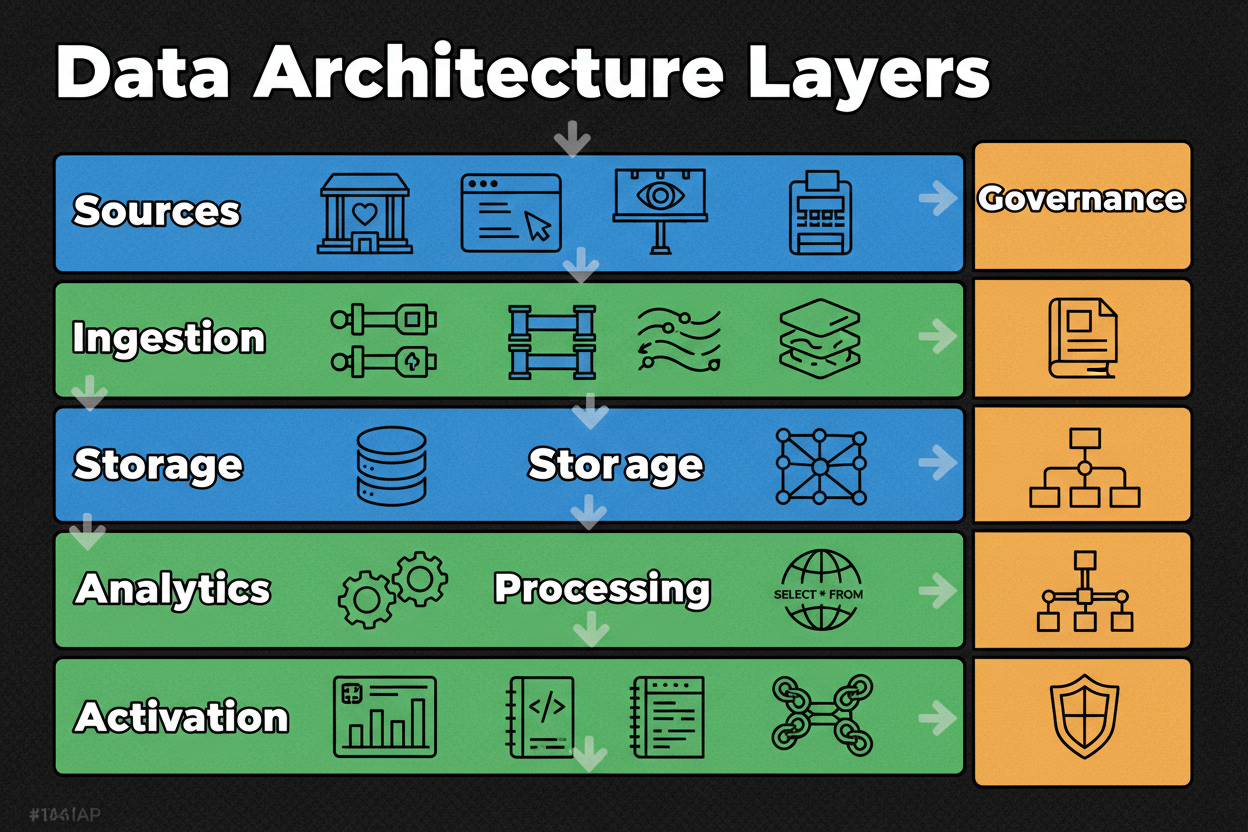
Every solid platform uses the same backbone. Start with sources: web and app events, CRM, ads, POS, customer support, and product telemetry. You want both historical loads and ongoing updates.
Ingestion is next. Use connectors for APIs, scheduled batch for files, streaming for high-velocity events, and change data capture for operational systems. Land data in storage that can handle raw and modeled layers, typically a lake or lakehouse.
Processing and modeling shape raw inputs into clean entities and facts. Think SQL transforms, dbt-like projects, and an identity graph that merges keys safely. Analytics tools plug into the governed store, while activation sends segments back to channels via reverse ETL or APIs. Governance runs across it all with catalog, lineage, policies, and access controls.
Integration patterns that work in the real world
Batch is the workhorse. Use scheduled loads for CRM, POS, and partner files where hourly or daily freshness is fine. Batch is simple, cheap, and reliable, which is why it powers most reporting and many audience refreshes.
Near-real-time streaming adds speed for on-site personalization, cart abandonment, and rapid suppression. Stream web and app events into your platform, then publish segments or decisions within minutes. Use it when latency drives revenue or customer experience.
API-based syncs fit paid media and SaaS tools. Respect rate limits, handle retries, and design idempotent upserts so jobs can restart cleanly. Event-driven patterns glue it together. Emit internal events when identities merge, consent changes, or attributes update, then trigger activation or reprocessing automatically. The rule of thumb: start batch, add streaming where the business case is clear, and keep APIs for gaps you can’t fill with connectors.
A canonical reference architecture
Picture a layered stack that balances flexibility with control. Data flows from sources into an ingestion tier that supports connectors, ETL and ELT, CDC, and streaming. Everything lands in storage with both bronze (raw), silver (clean), and gold (modeled) layers.
Processing transforms data, applies business rules, and maintains the identity graph. Modeling creates reusable entities like customer, account, event, and product. Analytics sits on top with BI and notebooks running against governed datasets and features.
Activation uses reverse ETL and native connectors to push segments and attributes to email, ads, mobile, and web personalization. Governance is a horizontal layer: catalog your assets, track lineage, enforce access policies, and monitor quality. This structure lets data teams and marketers move fast without losing control.
Step-by-step: integrating a new source and activating an audience
Let’s wire an ad platform and CRM end to end. First, create the ad platform connector and authenticate with scoped credentials. Pull a small date range to confirm fields and data types. In parallel, catalog CRM fields, tag PII, and agree on customer IDs and match keys.
Backfill a limited window to test throughput and dedupe rules. Transform both datasets into a common schema, then join ad IDs to CRM identities through your identity graph. Validate with record counts, spot checks, and metric parity against source dashboards. Build a “recent purchasers” suppression audience, publish it to the ad platform, and confirm receipt with API logs and a holdout test. Monitor match rate, latency, and error alerts for the first two refresh cycles.
- Data mapping: field inventory, schema versions, PII fields tagged
- Connectivity: API keys, OAuth scopes, rate limits, retries
- Data quality: null thresholds, dedupe rules, timestamp standards
- Identity: primary keys, identity graph strategy, merge rules
- Performance: batch sizes, SLAs, monitoring alerts
- Security: encryption in transit/at rest, key management
- Testing: sample records validation, backfill plan, reconciliation logs
- Documentation: runbooks, lineage, change management
Data Governance, Security, and Compliance in Marketing Data Platforms
- Consent captured and honored across channels
- Legal basis and purpose recorded per dataset
- Data rights workflows for discovery, export, delete
- Vendor DPAs and subprocessors documented
- Retention schedules by data class enforced
- Immutable audit logs for changes and access
- Ongoing training and clear accountability
Why governance is non-negotiable
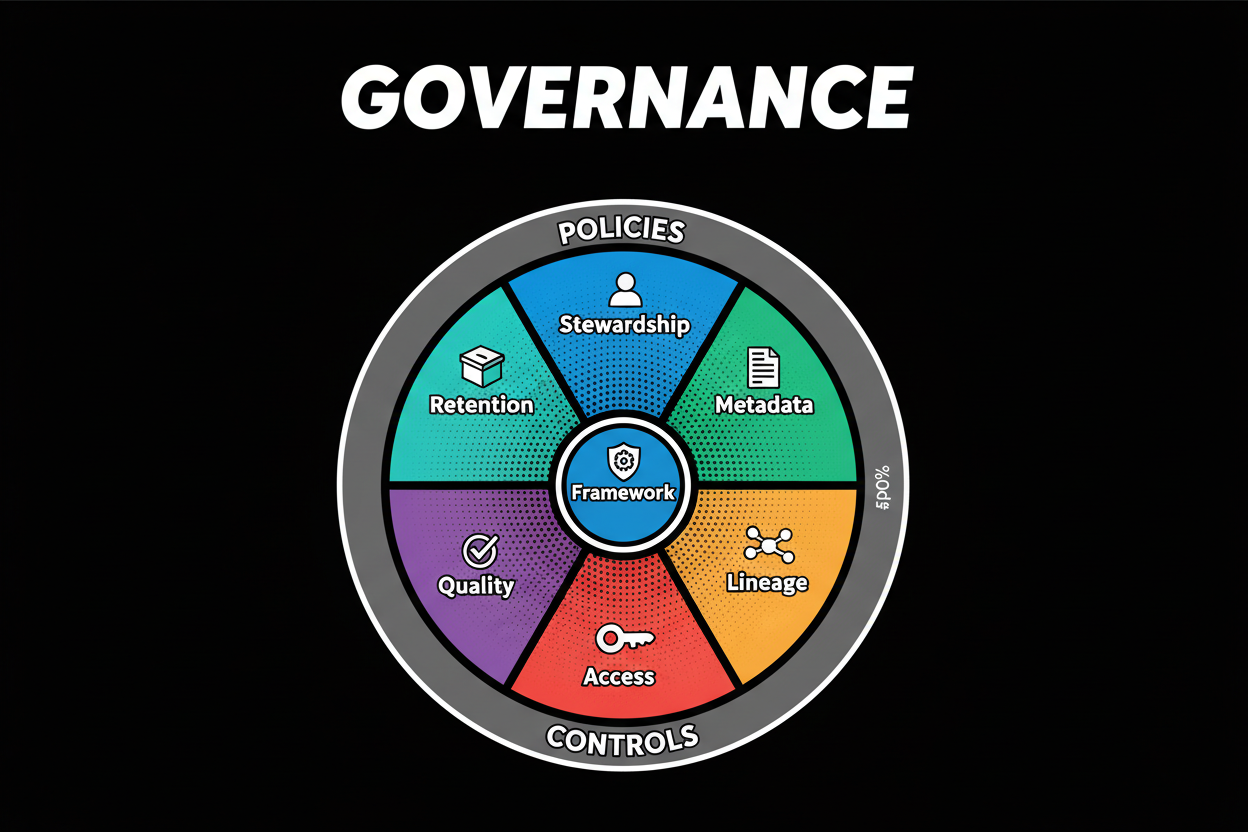
Governance protects trust and keeps you fast. When definitions, lineage, and access are clear, analysts ship insights without rework. Marketers activate segments without fear of mixing audiences or violating preferences.
It also reduces regulatory risk. Consent travels with the data, and usage is limited to agreed purposes. If something breaks, you know where, when, and why. Strong governance turns your marketing data platform from a risky tangle into a reliable system of record for activation.
Core governance principles for marketing data
Start with stewardship. Assign owners for major domains like customer, account, event, and product. Owners define field meanings, quality rules, and who can change what. Back this with a metadata catalog so teams can find, trust, and reuse datasets.
Lineage and observability show how data flows and where it transforms. When a metric looks off, lineage helps you trace the issue to a bad source file or a changed field. Access controls enforce least privilege so only the right people and systems can see the right data. Add SLAs for freshness and quality, then monitor them. Finally, practice minimization and retention. Keep what you need, drop what you don’t, and expire data on a schedule tied to business and legal requirements.
Security best practices without the jargon
Encrypt everything. Use TLS in transit and platform-native encryption at rest. Manage keys with a centralized service, rotate them on a schedule, and avoid embedding secrets in code. Store credentials in a secure vault and scope them to the minimum required permissions.
Control access with roles tied to business functions, not individuals. Map identities through your SSO provider so access revocation is instant. Monitor for anomalies with alerts on unusual reads, failed logins, and privilege changes. Limit service accounts, rotate tokens, and prefer short-lived credentials. Keep prod and non-prod separate, and treat your CI/CD pipeline as a sensitive system with its own controls.
Compliance checklist you can run this week
- Consent & preferences: capture, store, honor across channels
- Legal basis and purpose mapping: documented per dataset
- Data subject rights: discovery, export, delete workflows
- Vendor management: DPAs, subprocessors, cross-border controls
- Retention & deletion: schedules by data class
- Auditability: immutable logs, change history, evidence of controls
- Training & accountability: roles, recurring reviews, breach playbooks
A consumer brand applied this checklist to consent. They synced preference centers in CRM with email and ads through the platform’s identity graph. Consent updates triggered an event that revoked audience eligibility within minutes, with immutable logs proving when changes occurred. Result: a measurable drop in opt-out violations and a lift in deliverability because suppression stayed accurate and fresh.
These controls don’t slow teams down. They let you activate faster with fewer escalations, because policy is enforced in the data fabric, not in slide decks. With governance and security in place, you’re ready to evaluate vendors and run a clean RFP that proves value before you buy.
Evaluating Vendors and the Marketing Data Platform Landscape
- Scale and performance at your volumes
- Connector depth and maintenance cadence
- Openness and interoperability with your stack
- Reliability and SLAs you can enforce
- Governance, security, and compliance controls
- Identity resolution quality and transparency
- Pricing and total cost of ownership
Choosing a vendor is not about the flashiest demo. It’s about fit, proof, and control. Push vendors to show your data, your latency, and your activation targets. Ask for hard numbers on throughput, error rates, and match rates on a real sample.
Look past surface-level connectors. You want details on schema coverage, incremental syncs, rate-limit handling, and how often connectors break and get fixed. Demand openness: export everything you create, and keep your identity graph portable. Portability protects your strategy from lock-in.
Reliability beats promises. Validate SLAs, failover, and monitoring. TCO matters just as much as license price. Include data egress, storage, compute, and the services you will need to reach first value. Finally, ask for roadmap transparency and named support contacts. You’re buying outcomes and a partnership, not only software.
| Criterion | Weight (%) | Vendor A | Vendor B | Vendor C | Notes |
|---|---|---|---|---|---|
| Data ingestion breadth | Source coverage, backfill, CDC, streaming | ||||
| Real-time capabilities | Event latency, SLA, burst handling | ||||
| Identity resolution quality | Deterministic rules, probabilistic logic, transparency | ||||
| Modeling flexibility | dbt-like support, custom entities, governance hooks | ||||
| Activation connectors | Reverse ETL, native channel APIs, retries | ||||
| Governance & catalog | Metadata, lineage, access controls | ||||
| Security & compliance | Encryption, SSO/IAM, consent and purpose enforcement | ||||
| Scalability/performance | Throughput, concurrency, cost at scale | ||||
| Support/SLAs | Response times, success managers, training | ||||
| Pricing/TCO | License, usage, services, egress, ramp terms |
What to evaluate beyond a demo
Make the vendor prove scale with your sample. Hand them a week of real data, including edge cases, then measure ingestion speed, error rates, and how fast audiences land in channels. If they can’t run a realistic load, treat that as a warning.
Interrogate connectors. Are they built and maintained in-house, or thin wrappers over third parties? What’s the policy for breaking API changes, and how fast do they patch? Ask to see connector release notes and an incident history.
Openness matters. Require full export of raw, modeled, and identity data. If they say “we can export most of it,” push for specifics. Reliability should be observable. Look for native dashboards, alerting, and runbooks you can adopt. For cost, build a simple TCO model that covers ramp, steady state, and growth. Include professional services, because you’ll likely need them to go live cleanly.
How to run an effective RFP and pilot
Keep the RFP focused on the work that proves value. Write two or three use-case scripts, provide sample datasets, and define success criteria upfront. If you can’t measure it in a 4 to 6 week pilot, it’s not core to your choice right now.
Require a sandbox with admin access so you can inspect data models, governance options, and logs. Lock in exit terms: you own all data and transformations, and you can export at any time in open formats. Align your internal team to make the pilot real, not a vendor-only show.
- Business scope: objectives, KPIs, use cases
- Technical scope: data sources, volumes, latency expectations
- Security/compliance: controls, certifications, audits
- Services: onboarding, training, managed services
- Pilot details: datasets, scripts, timeline, success criteria
- Commercials: pricing structure, renewal terms, exit options
Understanding the vendor landscape
End-to-end platforms bundle ingestion, storage, identity, analytics, and activation. They shine for teams that want speed and a single throat to choke, but you trade some flexibility. Composable stacks bring best-of-breed parts together. They fit orgs with strong data teams that want more control and cloud alignment.
Activation-first tools focus on segments, journeys, and channel delivery. They’re powerful for marketers but often need a deeper data layer under the hood to scale. Cloud-native builds lean on your existing lakehouse and warehouse. They minimize net-new tools but require engineering maturity to match marketer needs.
Pick the pattern that fits your capacity. If you lack engineering depth, end-to-end or activation-first can get you live faster. If you have a seasoned data platform, a composable or cloud-native approach may give you better economics and control.
Aligning stakeholders and proving value early
Map PoC milestones to visible business outcomes. Week 1: data lands, identity keys align. Week 2: first audience publishes. Week 3: suppression and eligibility rules enforce correctly. Week 4: match-rate lift and activation latency reported.
Keep executive updates frequent and simple. Show a dashboard with ingestion speed, match rates, and first activation latency. Add a line for media suppression savings and time-to-insight. Plan change management early so ownership is clear once you pick a vendor. Then use the scorecard below to call pass or fail without debate.
| Scenario | Expected Outcome | Actual Outcome | Pass/Fail | Notes |
|---|---|---|---|---|
| Ingestion speed | 10M records in < 2 hrs | |||
| Identity match rate | ≥ 55% cross-channel | |||
| Query performance | Key model in < 30 sec | |||
| Activation latency | Segment to channel < 15 min | |||
| Data quality rules | < 1% nulls on required fields | |||
| Error handling | Automatic retries, alert sent | |||
| Monitoring & alerts | Dashboards and on-call runbooks |
Frequently Asked Questions About Marketing Data Platforms
Q: What’s the difference between a marketing data platform and a CDP?
A marketing data platform unifies and governs data for analytics and activation across your stack, while a CDP is a marketer-facing layer for segmentation and orchestration.
The platform is the foundation. It ingests, models, resolves identities, and enforces governance across every channel. A CDP typically sits closer to execution, offering easy segment building, journeys, and channel connectors. Many teams use both: the platform as the backbone and the CDP as the control panel. If you must pick one first, start with the platform to avoid piling features onto fragmented data.
Q: How do I ensure data quality and accuracy across sources?
Treat quality as a product. Define field-level rules, set thresholds, and monitor them like uptime. Put validation at ingestion to catch nulls, schema drift, and duplicates before they pollute downstream.
Build golden entities with clear owners. Customer, account, and product should have documented definitions and tests. Use lineage to trace discrepancies fast. Finally, measure quality with a small set of KPIs: freshness, completeness, uniqueness, and match rate. When quality is visible, teams fix issues quickly because everyone sees the impact.
Q: What are the biggest implementation pitfalls and how do I avoid them?
Ownership and scope cause most failures. If nobody owns identity, consent, and data definitions, the build stalls. Over-customizing early is another trap. You don’t need every edge case in phase one.
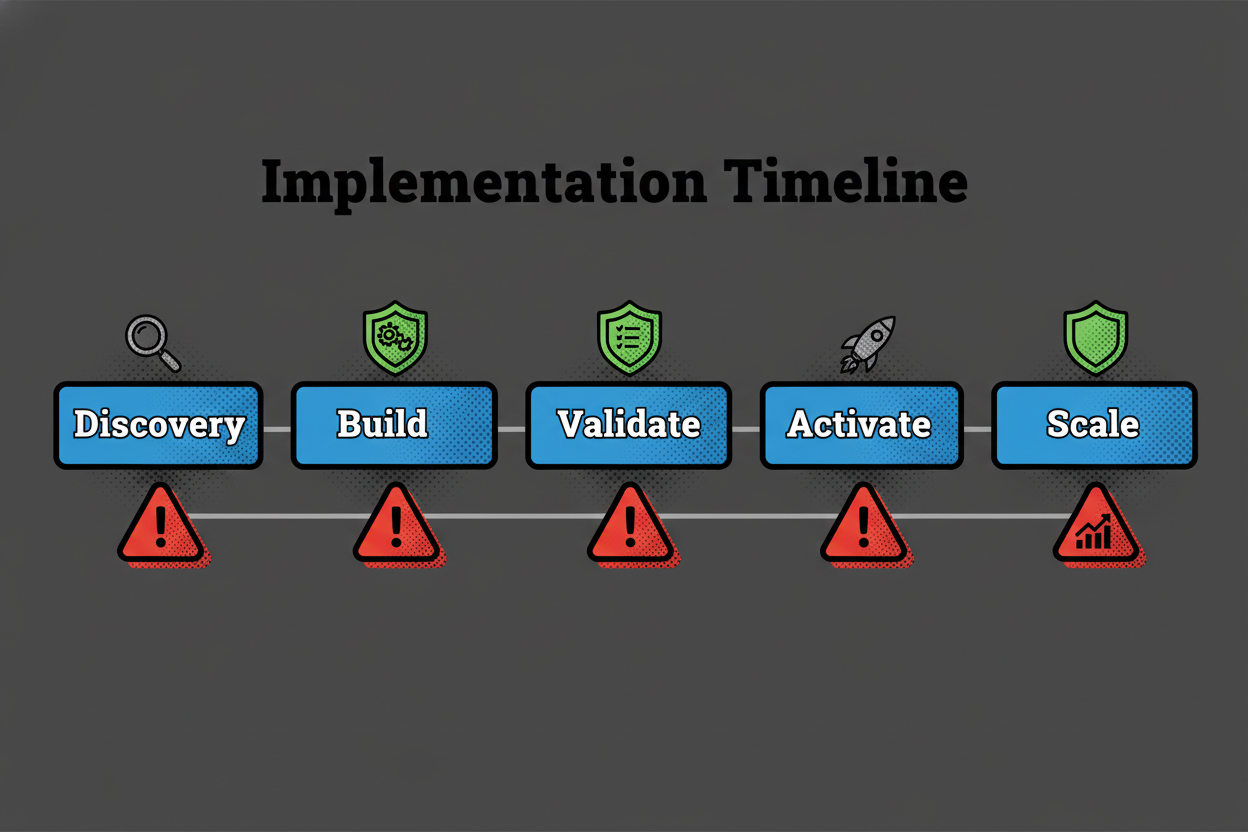
Start with a thin slice that proves value: ingestion from 2-3 core sources, baseline identity, and one activation. Lock roles and escalation paths. Stand up governance in parallel so consent and access policies are wired from day one. Use the integration checklist and PoC scorecard to keep the path tight and testable.
Q: How do I measure ROI from a marketing data platform?
Tie it to hard numbers. Start with media suppression savings: how many impressions did you avoid by excluding recent buyers or unsubscribes? Next, look at conversion lift from better targeting and personalization. Track time-to-insight: days shaved off reporting cycles. Add productivity gains, like fewer manual exports, and reduced data incident time.
Create a simple ROI model. Inputs: media spend, baseline CPA, suppression rates, conversion rates, and hourly costs for analyst and engineering time. Show monthly impact, not just annualized promises. When stakeholders see dollar savings and time saved within weeks, momentum follows.
Q: Can I keep my data warehouse and still deploy a marketing data platform?
Yes. The warehouse remains your enterprise system of record. The platform complements it with identity resolution, consent-aware modeling, and activation connectors designed for marketing speed.
Use the warehouse for broad analytics, finance, and historical reporting. Use the marketing data platform to unify identities, enforce policy, and publish segments back to channels. Many teams read and write between the two, using the platform’s models in the warehouse and surfacing warehouse-calculated attributes into activation. It’s a partnership, not a replacement.
Q: How real-time does my platform need to be?
Real-time should be a business decision, not a default setting. If your use case is cart abandonment, fraud triggers, or high-velocity personalization, minutes matter. If it’s monthly cohort analysis or quarterly attribution, batch is fine.
Run the math. What revenue impact does a 10-minute delay have for this use case? If the impact is small, save the complexity and cost. Start batch, then add streaming where latency drives measurable outcomes. Keep a single identity graph and policy layer for both, so you don’t create two truths.
Q: How should identity resolution be designed and measured?
Design identity with clarity and safety. Start with deterministic rules for strong keys like email, phone, and customer IDs. Add probabilistic signals only when they improve match rate without creating risky merges. Store merge rules and history for auditability.
Measure it with three metrics: overall match rate across channels, precision on known keys, and the impact on activation (like reach and suppression accuracy). Review merge conflicts weekly at launch, then monthly. Identity isn’t set-and-forget – it’s a living asset that improves as you learn.
Q: What’s the best team structure to own a marketing data platform?
Use a dual-owner model. Data teams own ingestion, modeling, identity, and governance. Marketing ops owns use cases, segments, and activation. Both share a platform backlog and success metrics.
Create clear swim lanes. Data handles pipelines and SLAs. Marketing defines audiences, QA in channels, and reports outcomes. Add a product manager to prioritize work and a security partner who signs off on policies. When roles are crisp, delivery speeds up because handoffs aren’t fuzzy.
Conclusion and Next Steps: Accelerate Your Marketing Data Platform Journey
What to remember as you design your platform
Unify data first, then scale use cases. Without a trusted core, activation turns into duct tape. Bake governance into the fabric so consent and access travel with the data. Treat identity as a product with rules, reviews, and metrics.
Build for activation from day one. Keep analytics and activation on the same rails so teams move quickly with confidence. Deliver in increments. One source, one model, one audience at a time. That steady drumbeat beats big-bang projects every time.
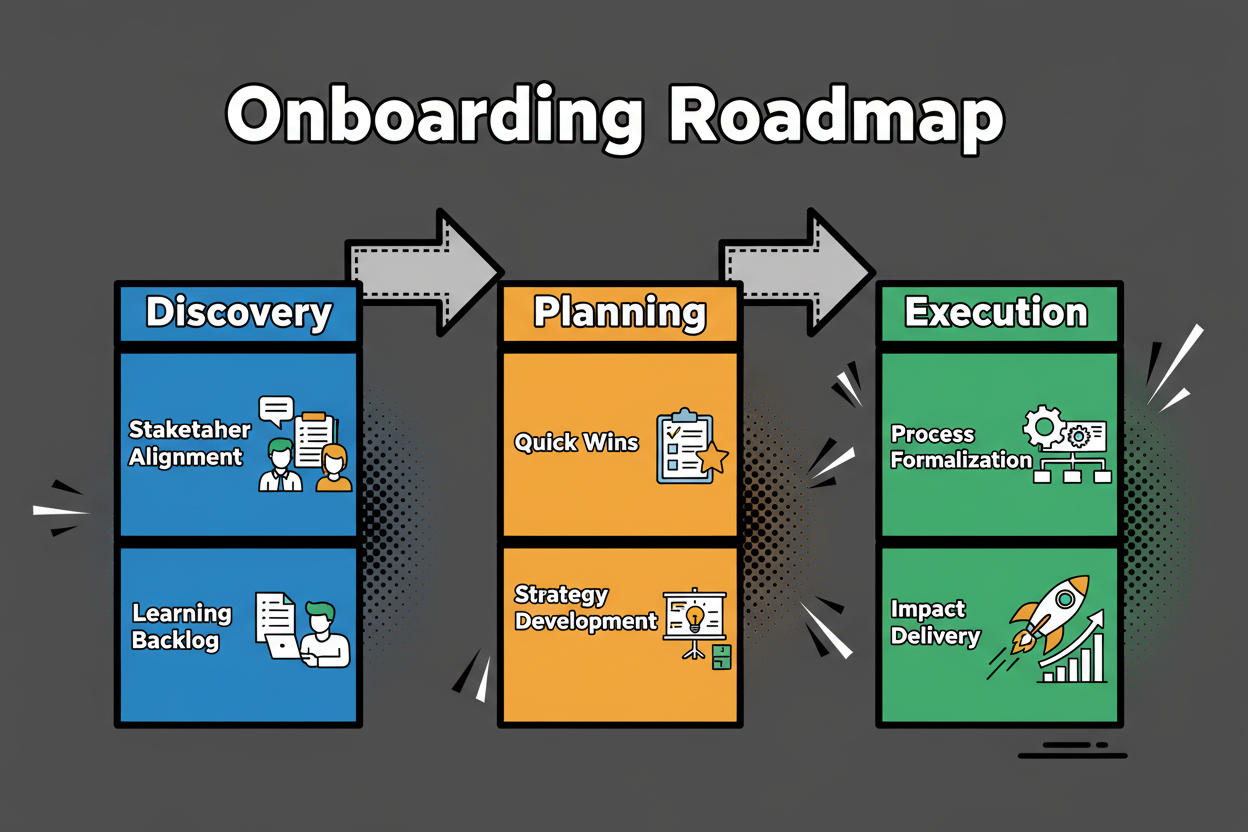
Your first 30-60-90 days roadmap
Days 0-30: Align sponsors and owners. Inventory sources, keys, and consent signals. Define two use cases and write success criteria. Pick build or buy, plus your architecture shape.
Days 31-60: Stand up ingestion for core sources. Implement baseline identity and a governed data model. Run a PoC that publishes one audience to one channel. Measure match rate, latency, and quality.
Days 61-90: Expand activation to a second channel. Wire monitoring and runbooks. Hold governance and security reviews. Train teams on self-serve workflows. Ship your first closed-loop measurement so you can show impact and secure more runway.
Use the templates and diagrams as your working toolkit
Reuse the decision matrix, vendor evaluation table, and PoC scorecard in your steering meetings. Drop the architecture and governance diagrams into your design docs. Bring the integration and compliance checklists to every new connector and campaign.
These tools cut debate and speed approvals. They help you ship, learn, and scale. Keep them close and update them as your platform matures.
You’re ready. Pick one use case, apply the templates, and run a focused PoC. In a few weeks you’ll have unified data powering real activation, proof of ROI, and a clear path to scale.
Key Takeaways
- Start with unification and identity, then scale activation.
- Measure value with suppression savings, lift, and latency.
- Choose vendors with proof, openness, and strong governance.
- Use small, realistic pilots to cut risk and build momentum.
- Keep governance and security in the data fabric, not in slide decks.
- Ship in increments: one source, one audience, one channel.
- Treat the platform as a product with owners, SLAs, and a roadmap.