
At its core, calculating your return on ad spend (ROAS) is pretty simple: you divide the total revenue from an ad campaign by what you spent on it.
Spend $1,000 on ads and get $5,000 back in revenue? That’s a 5x ROAS, or 500%. This number is your quickest gut check on whether an ad campaign is pulling its weight.
Understanding ROAS Beyond the Simple Formula

While that basic formula is a great place to start, stopping there is a rookie mistake. Relying on it alone can be seriously misleading because it completely misses the nuances that actually determine profitability. To make ROAS a genuinely strategic tool, you have to dig much deeper than the surface-level numbers inside your ad platforms.
True profitability isn't just about top-line revenue. A campaign with a 5x ROAS looks like a home run, right? But what if your profit margin on those products is only 15%? Once you factor in the cost of goods sold and other operational expenses, that "winning" campaign could easily be losing you money.
Why Context Is Critical for ROAS
A number without context is just a vanity metric. Understanding the why behind your ROAS is what turns basic reporting into real business intelligence.
Here are a few factors that give your ROAS real meaning:
- Profit Margins: A high-margin business, like a SaaS company, can be profitable with a 3:1 ROAS. In contrast, a low-margin e-commerce store might need a 10:1 ROAS just to break even on ad spend.
- Industry Benchmarks: What’s considered "good" varies wildly. If you're in a super-competitive market, your acquisition costs will be higher, which naturally pushes down the average ROAS.
- Campaign Goals: Not every campaign is built for immediate sales. A top-of-funnel brand awareness campaign will almost always have a lower ROAS than a bottom-of-funnel retargeting campaign, and that's okay.
To give you a quick reference, here’s a breakdown of the core components that go into any ROAS calculation.
Core Components of a ROAS Calculation
| Component | Definition | Example Data Source |
|---|---|---|
| Revenue from Ads | The total income generated directly from customers who clicked on your ads before making a purchase. | Google Analytics 4, E-commerce Platform (e.g., Shopify), CRM |
| Cost of Ads | The total amount of money spent on placing the ads for a specific campaign or time period. | Google Ads, Meta Ads, Other Ad Platforms |
| ROAS (Return) | A ratio or percentage representing the return for every dollar spent, calculated as Revenue ÷ Cost. | A calculated metric in your reports |
Think of this table as your starting point. The real magic happens when you start layering on more sophisticated data.
The core challenge for marketers is moving past platform-reported ROAS to a metric that reflects actual business impact. The simple formula is your starting line, not the finish line.
The Growing Importance of Accurate Measurement
The need for dead-on ROAS calculations is more critical than ever. With global ad spend projected to blow past $1 trillion for the first time, hitting $1.08 trillion in 2025, the stakes for every marketing dollar are climbing.
The simple calculation (Revenue from Ads / Cost of Ads) has been a staple for years. A $10,000 campaign cost that drives $50,000 in revenue still gets you a 5:1 ROAS. But the industry has exploded, more than doubling from $384 billion in 2011 to over $768 billion by 2021. For marketers trying to navigate today's privacy shifts and complex tech stacks, mastering an accurate ROAS calculation is a survival skill.
You can dig into more on the trajectory of global advertising spend in this report from WARC.
Building Your Data Toolkit for Accurate ROAS
An accurate ROAS calculation isn’t born from a fancy formula. It’s built on a foundation of clean, reliable data. Before you even touch a spreadsheet or a dashboard, your first job is to become a data detective and source the right numbers from the right places.
Guesswork is the enemy of profitable advertising, so let’s get the toolkit assembled.
Your calculation really only needs two things: Ad Spend and Revenue. Finding these numbers seems simple enough, but the real challenge is making sure they’re telling the same story.
Start with Ad Spend: The Easy Part
Your journey begins where the money is spent—the ad platforms themselves. This is where you’ll pull your cost data, and it's usually the most straightforward piece of the puzzle.
- Google Ads: This is your source for all search, display, YouTube, and Performance Max campaign costs.
- Meta Ads: Pull your spend data for Facebook and Instagram campaigns here.
- Other Platforms: Don't forget costs from LinkedIn Ads, TikTok Ads, or any other channel you're running.
Each platform gives you a direct, unambiguous report of how much you've spent. This part is simple. The complexity kicks in when you try to tie that spend to actual, real-world revenue.
Unifying Your Revenue Data Sources
While ad platforms happily report on conversions and revenue, you should always treat those figures with a healthy dose of skepticism. They often rely on different attribution models that can easily inflate performance. Your goal is to find a single source of truth for revenue—the number that actually hit your bank account.
This means pulling data from the systems that track the final transaction:
- Web Analytics Platforms: Google Analytics 4 (GA4) is the central nervous system for most marketers. It tracks user behavior and attributes revenue across different traffic sources, giving you a much more holistic view than any single ad platform can.
- E-commerce Platforms: For online stores, systems like Shopify, BigCommerce, or Magento are your ultimate source of truth for sales data. The revenue reported here is non-negotiable.
- Customer Relationship Management (CRM) Systems: If you're in B2B or have a longer sales cycle, your CRM (like Salesforce or HubSpot) is where marketing-generated leads are tracked through to closed-won deals. This is absolutely essential for connecting ad spend to high-value contract revenue.
The golden rule of data sourcing is this: Trust your internal systems for revenue and the ad platforms for cost. The magic happens when you reconcile the two—that's where you'll find the real story behind your performance.
Handling the Inevitable Data Discrepancies
You're going to notice it right away: the revenue Google Ads reports almost never matches what GA4 attributes to Google Ads. And that number might not perfectly align with your Shopify sales data either.
This is completely normal. Don't panic.
Discrepancies happen because of differences in tracking (pixel-based vs. server-side), attribution windows, and how each platform even defines a "conversion." The key is to choose one platform as your definitive source for revenue—usually your e-commerce platform or CRM—and use it as the baseline for all your ROAS calculations. This creates consistency and ensures you're measuring against actual business results, not just platform-reported vanity metrics.
The push toward digital advertising is undeniable, with projections showing it will account for over 75% of global spend by 2025. To compute ROAS effectively in this environment, you have to divide attributable revenue by ad costs, but you also need to layer in multi-touch attribution for a clearer picture. This is crucial as internet ad spending is expected to hit $723.6 billion by 2026.
For marketers using GA4 or Google Tag Manager, this means meticulously auditing your tracking to capture true ROAS. It's especially important since major players like Alphabet (which commanded 25% of 2023 global revenues), Meta, and Amazon often report inflated numbers without custom models. You can explore more on these global ad spending trends and what they mean for marketers on Abbey Mecca.
By layering in data that goes beyond the initial sale, you can start to understand the long-term impact of your advertising. To dig deeper into this, check out our guide on how to measure customer lifetime value.
Calculating ROAS in the Real World
Alright, you've got your data sources lined up. Now for the fun part: turning those raw numbers into something that actually helps you make smarter decisions. This is where we move from just collecting data to using it for real strategic impact.
Let's break down how you can actually calculate your return on ad spend, starting with the basics in a spreadsheet and working our way up to a fully automated system.
The path is pretty clear: you need to connect the dots from what people see (ad impressions), to what they do (website behavior), to what they buy (revenue).
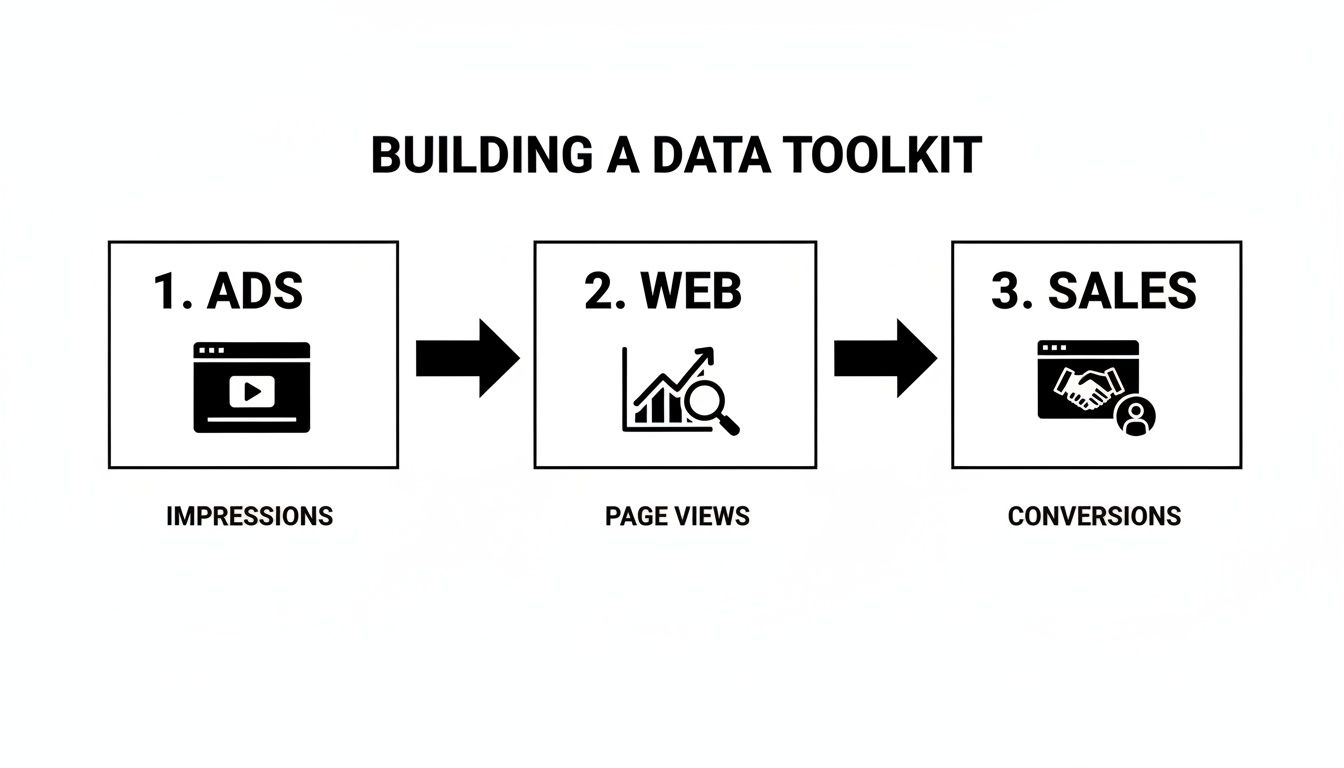
This simple flow is a great reminder that you can't get a true picture of performance without linking ad spend from platforms like Google Ads, user actions from your analytics, and the final sales numbers from your CRM or e-commerce platform.
Campaign-Level ROAS in a Spreadsheet
The simplest, most direct way to get started is with a good old-fashioned spreadsheet. Whether you're a Google Sheets fan or an Excel purist, this hands-on method gives you a crystal-clear look at how a single campaign performed.
Let's say you ran a "Summer Sale" campaign on Google Ads last month.
First, pop into your Google Ads account and find the total Ad Spend for that campaign. For this example, we'll say it was $2,500.
Next, head over to Google Analytics 4. You'll want to filter your reports to see only the revenue that GA4 has attributed to your "Summer Sale" campaign (this is where clean UTM parameters are a lifesaver). Let’s imagine GA4 shows $12,500 in revenue.
In your spreadsheet, you just need a few columns: "Campaign," "Ad Spend," and "Revenue." The fourth column, "ROAS," is where you plug in the formula: Revenue / Ad Spend.
So, for our summer sale, the math is simple: $12,500 / $2,500 = 5.
Your ROAS is 5x, or 500%. That’s the kind of concrete number you can act on. It tells you that for every single dollar you put into that campaign, you got five dollars back.
This manual check is your foundation. It’s not fancy or automated, but it forces you to get your hands dirty with the raw data and gives you an immediate signal on a specific marketing push.
Aggregating for Channel-Level ROAS
While campaign-level ROAS is perfect for tactical tweaks, your boss probably wants to know how an entire channel is doing. Calculating this just means rolling up the data from all the campaigns running on that platform.
For instance, to figure out your total Google Ads ROAS for Q2:
- Sum Up Your Costs: Add up the ad spend from every single Google Ads campaign you ran in the quarter—Search, PMax, Display, all of it. Let’s say that totals $50,000.
- Sum Up Your Revenue: In GA4, isolate the total revenue attributed to the
google / cpcsource/medium for that same time frame. We'll say this comes out to $225,000. - Do the Math:
$225,000 / $50,000 = 4.5x.
This 4.5x ROAS gives you that high-level, strategic view of your paid search program. Now you have a powerful benchmark. You can compare it to your Meta Ads ROAS (e.g., $150,000 revenue / $40,000 spend = 3.75x) and start making informed decisions about where to put your budget next quarter.
Leveling Up with Dynamic Dashboards
Let's be honest, pulling these numbers by hand every week is tedious and leaves way too much room for human error. This is exactly why building a dynamic dashboard in a tool like Looker Studio (what used to be Google Data Studio) is a total game-changer.
By connecting Looker Studio directly to your Google Ads and GA4 accounts, you can build a report that calculates and visualizes your ROAS in near real-time. Think scorecards showing your overall ROAS, tables breaking it down by campaign, and charts tracking performance over time.
This move frees you from spreadsheet hell and gives stakeholders an always-on, easy-to-understand view of performance. It also opens the door to blending data from multiple sources to calculate a true cross-channel ROAS. For anyone wanting to take this a step further with a more advanced statistical approach, it's worth exploring what marketing mix modeling is to get a top-down view of channel impact.
To help you decide which approach is right for you, here’s a quick comparison of the different methods.
ROAS Calculation Methods Compared
| Platform | Best For | Complexity | Key Advantage |
|---|---|---|---|
| Spreadsheets | Quick, one-off campaign analysis and getting a feel for the raw data. | Low | Simple, transparent, and forces you to understand the inputs. |
| Looker Studio | Ongoing monitoring, stakeholder reporting, and visualizing trends. | Medium | Automated, real-time data, and easy to share with non-technical users. |
| BigQuery | Deeply customized analysis, custom attribution, and large datasets. | High | Ultimate flexibility to build your own models and join disparate data sources. |
Each method has its place. You might start with spreadsheets for a new campaign, graduate to a Looker Studio dashboard for your core channels, and eventually move to a data warehouse as your needs grow more complex.
Advanced Automation Using BigQuery
For businesses with massive datasets or the need for very specific, custom logic, stepping up to Google BigQuery is the final frontier. BigQuery is a powerful data warehouse that lets you pipe in data from all your ad platforms, analytics tools, and even your CRM.
From there, you can write sophisticated SQL queries to build your very own ROAS models from the ground up.
For example, you could write a query that joins your Google Ads cost data directly with your CRM's offline revenue data. You could even apply your own custom attribution model that assigns value differently than the defaults in GA4 or the ad platforms. This is how you get to a ROAS calculation based on your company's unique view of the customer journey—a far more accurate measure of true marketing profitability.
Moving from ROAS to Actual Profitability
A high ROAS figure can feel like a major win, but it often masks a critical truth: revenue is not profit. This is where sharp, experienced marketers separate themselves from the pack, digging past the surface-level metrics to find the real business impact of their campaigns.
It’s about finally answering the C-suite's toughest question: how much actual profit did this campaign generate for the business? Getting to that answer means layering in crucial business context that ad platforms simply don't have.
Incorporating Profit Margins for True Profitability
Let's go back to that 5x ROAS campaign. It looks great in a report, but if your product only has a 20% profit margin, the story changes completely. A $12,500 revenue figure from a $2,500 ad spend only generated $2,500 in gross profit ($12,500 * 0.20).
When you subtract your $2,500 ad cost from that profit, you’re left with $0. Your "successful" campaign just broke even.
To get a more honest, profit-driven view, you need to adjust the formula:
Profit-Adjusted ROAS = (Gross Profit from Ads – Ad Spend) / Ad Spend
Using this, the campaign’s real return is ($2,500 - $2,500) / $2,500 = 0. Suddenly, that 5x ROAS doesn't seem so impressive anymore. This simple shift moves you from a vanity metric to a genuine measure of financial health.
A common rule of thumb is that a 5:1 revenue-based ROAS is strong. But this benchmark crumbles without the context of margins. A SaaS company with 80% margins can thrive on a 3:1 ROAS, while a retailer with 15% margins might need a 10:1 ratio just to turn a profit.
Broadening the Scope with Return on Marketing Investment
Your ad spend is just one piece of the puzzle. What about the fees for the creative agency that designed the ads, the salaries of the team managing the campaigns, or the subscription for your marketing automation software?
These are all real expenses, and ignoring them inflates your returns. This is where calculating Return on Marketing Investment (ROMI) gives you a much more complete picture. ROMI accounts for all marketing costs, not just the media buy.
The ROMI formula is straightforward:
ROMI = (Revenue from Marketing – Total Marketing Cost) / Total Marketing Cost
Your total marketing cost should include things like:
- Media Spend: The direct cost of your ads.
- Creative Costs: Fees for design, copywriting, or video production.
- Technology Costs: Subscriptions for your CRM, analytics tools, and other MarTech.
- Personnel Costs: A portion of the salaries for the marketing team members involved.
This holistic approach gives you a much more sober—and accurate—view of your marketing department’s efficiency as a true growth engine for the business.
How Attribution Models Change Everything
The way you assign credit for a conversion dramatically warps your calculated ROAS. Different attribution models can tell completely different stories about the exact same campaign data.
Let's imagine a typical customer journey:
- Sees a Facebook ad (First touch)
- Reads a blog post from an organic search result
- Clicks a Google retargeting ad and makes a purchase (Last touch)
How you attribute that sale changes everything:
- Last-Click Attribution: This model gives 100% of the credit to the Google retargeting ad. Your Google Ads ROAS looks fantastic, but your Facebook campaign looks like a total failure.
- First-Click Attribution: This flips the script and gives 100% of the credit to the initial Facebook ad. Now, Facebook looks like the hero, and Google Ads gets zero credit for closing the deal.
- Data-Driven Attribution: More advanced models use machine learning to analyze thousands of conversion paths, assigning fractional credit to each touchpoint based on its actual influence. This usually provides the most balanced and realistic view.
The model you choose directly influences which channels get budget. Over-relying on last-click can lead you to mistakenly cut funding for top-of-funnel activities that are essential for introducing new customers to your brand in the first place. For a deeper look, you should learn more about what marketing attribution is and how the different models can shape your entire strategy.
The Hidden Impact of View-Through Conversions
Not all conversions start with a click. A view-through conversion (VTC) happens when someone sees your ad (like a YouTube video or a display banner), doesn't click, but later converts on your website through another channel.
These are often overlooked but can be a powerful indicator of a campaign's brand impact. Ad platforms like Google and Meta track VTCs, but they are frequently debated because the causal link isn't as direct as a click.
Still, ignoring them means you might underestimate the true value of your awareness-focused campaigns. If a display campaign has a low click-based ROAS but a high number of view-throughs, it might be effectively influencing future buyers, even if it’s not the final touchpoint. Including VTCs in your analysis provides a more complete story about how your ads influence the entire customer journey, not just the final action.
A Practical Checklist for Auditing Your ROAS

Bad data doesn't just create messy reports; it leads to bad decisions. I've seen it happen countless times—a single broken tracking parameter or a misaligned conversion window completely derails a budget strategy. You end up pouring money into losing campaigns or, even worse, cutting your winners.
To build real trust in your numbers, you need a routine quality assurance (QA) playbook. This checklist is your practical guide for auditing your ROAS calculations. Think of it as a way to spot errors before they blow up your strategy, creating a measurement framework that gives you and your leadership total confidence in the data you present.
Verifying Your Data Sources
The integrity of your ROAS calculation lives and dies by the quality of its source data. If the numbers you start with are flawed, every insight you pull from them is built on a shaky foundation. Your first move should always be to confirm that the numbers you’re pulling are clean, consistent, and correctly aligned.
Start by comparing the revenue figures from your ad platforms (like Google Ads or Meta for Business) against your primary source of truth. For most, that's Google Analytics 4 or a CRM like Salesforce. You should expect some discrepancies—they'll never match perfectly—but investigate any major gaps. A difference of more than 10-15% is usually a red flag that something is wrong.
Here’s a quick verification routine I run through:
- Confirm Time Zones: Make sure all your platforms—ad networks, analytics, CRM—are set to the exact same time zone. It’s a simple mistake, but a mismatch can easily shift daily revenue and cost data, throwing off your calculations.
- Check Currency Settings: This sounds obvious, but it’s a surprisingly common slip-up in global campaigns. Verify that all costs and revenues are being reported in the same currency or are converted at a consistent, documented rate.
- Audit Your Revenue Source: Are you basing ROAS on GA4's reported revenue or the hard numbers from your backend CRM? Pick one single source of truth and stick with it. Consistency is everything.
The goal isn't to make the numbers match down to the last penny—they won't. The real goal is to understand why they differ and be confident that the variance is within an acceptable range. Documenting this helps build trust when you present your findings.
Spotting Common Tracking Issues
Technical glitches are the silent killers of accurate ROAS reporting. A broken tag or an inconsistent UTM parameter can completely sever the link between your ad spend and the revenue it generates. Suddenly, your best campaigns look like they’re failing.
One of the most frequent culprits I see is sloppy UTM tagging. If one campaign uses source=google while another uses source=Google, your analytics platform sees them as two entirely different traffic sources. This fractures your data and makes clean analysis impossible. You have to establish and enforce a strict, lowercase naming convention for all your campaign parameters.
Keep an eye out for these red flags:
- Sudden Spikes or Dips: If a campaign’s ROAS suddenly shoots up to 20x or plummets to zero overnight, it’s almost never a miraculous shift in performance. It's a tracking error.
- High "(not set)" Traffic: Seeing a huge amount of "(not set)" or "direct" traffic that leads to conversions is a classic symptom of broken or missing UTMs on your paid campaigns.
- Tag Firing Failures: Use Google Tag Manager's preview mode or a browser extension to confirm your conversion tags are actually firing on key pages. This is especially important right after a website update.
Validating Your Formulas and Models
Finally, go back and sanity-check the actual logic you're using. Whether you’re working in a simple spreadsheet or a complex BigQuery model, a tiny error in a formula can have a massive ripple effect across all your reports.
For spreadsheets, physically click into the cells and trace the formula. Are you sure you’re dividing Revenue / Spend and didn't accidentally flip them? Are your SUM ranges capturing all the new campaigns you just launched? This kind of manual check catches more mistakes than you'd think.
If your setup is more advanced, validate your attribution model's logic. Is your last-click model accidentally pulling in direct traffic? Is your data-driven model getting a complete picture of all touchpoints? Regularly auditing these inputs ensures your model reflects reality and gives you a trustworthy foundation for the big strategic calls.
Answering Your Lingering ROAS Questions
Even after you’ve got the formulas down and your data is clean, some tricky questions about ROAS always seem to pop up. It’s completely normal to hit scenarios that don't fit perfectly into a spreadsheet. Let's tackle some of the most common questions marketers grapple with.
Think of this as your go-to reference for interpreting ROAS with total confidence.
What Is a Good ROAS, Anyway?
This is the million-dollar question, and the honest-to-goodness answer is: it depends entirely on your business. You'll often hear a general benchmark of a 4:1 ratio floating around—that's $4 back for every $1 spent. While it sounds nice, that number is almost meaningless without context.
Your business model dictates what "good" looks like.
- Low-Margin Businesses: An e-commerce store with a slim 15% profit margin might need a 10:1 ROAS just to break even after factoring in the cost of goods.
- High-Margin Businesses: On the other hand, a SaaS company with healthy 80% margins could be incredibly profitable with a 3:1 ROAS.
Instead of chasing a generic number, your first step should be to calculate your break-even ROAS. This is the point where your ad-driven profit equals your ad spend. Your real goal is to stay comfortably above that specific number.
How Is ROAS Different from ROI?
They sound similar, but ROAS and Return on Investment (ROI) are measuring two very different things. The easiest way to think about it is in terms of scope.
ROAS is a tactical metric. It's laser-focused on the effectiveness of a specific advertising spend. It answers one question: "For every dollar we put into these ads, how much revenue did we get back?"
ROI is a strategic business metric. It zooms out to measure the overall profitability of an entire initiative, accounting for all the associated costs—not just ad spend. This includes everything from team salaries and software subscriptions to creative fees and agency retainers.
In short, you use ROAS to optimize your ad campaigns day-to-day. You use ROI to evaluate whether your entire marketing function is actually profitable.
Should I Include View-Through Conversions in My ROAS?
Ah, the great debate. A view-through conversion (VTC) happens when someone sees your ad, doesn't click, but then converts later through another channel. Including them will almost always pump up your ROAS numbers, especially for brand awareness plays on platforms like YouTube or display networks.
Here’s a practical way to handle it:
- Calculate ROAS both ways. Run one calculation using only click-based conversions and a second one that includes VTCs.
- Use them for different things. Use the strict, click-based ROAS for optimizing your direct-response campaigns. Use the blended ROAS (with VTCs) to understand the broader influencing power of your top-of-funnel efforts.
This dual-view approach gives you a much fuller picture without mulling the data you rely on for sharp performance decisions. Just be transparent about which number you're presenting when you share it with stakeholders.
At The data driven marketer, we're obsessed with helping you move beyond surface-level metrics to find true profitability. Our in-depth guides provide the frameworks and playbooks you need to build a measurement strategy that drives real business growth. https://datadrivenmarketer.me